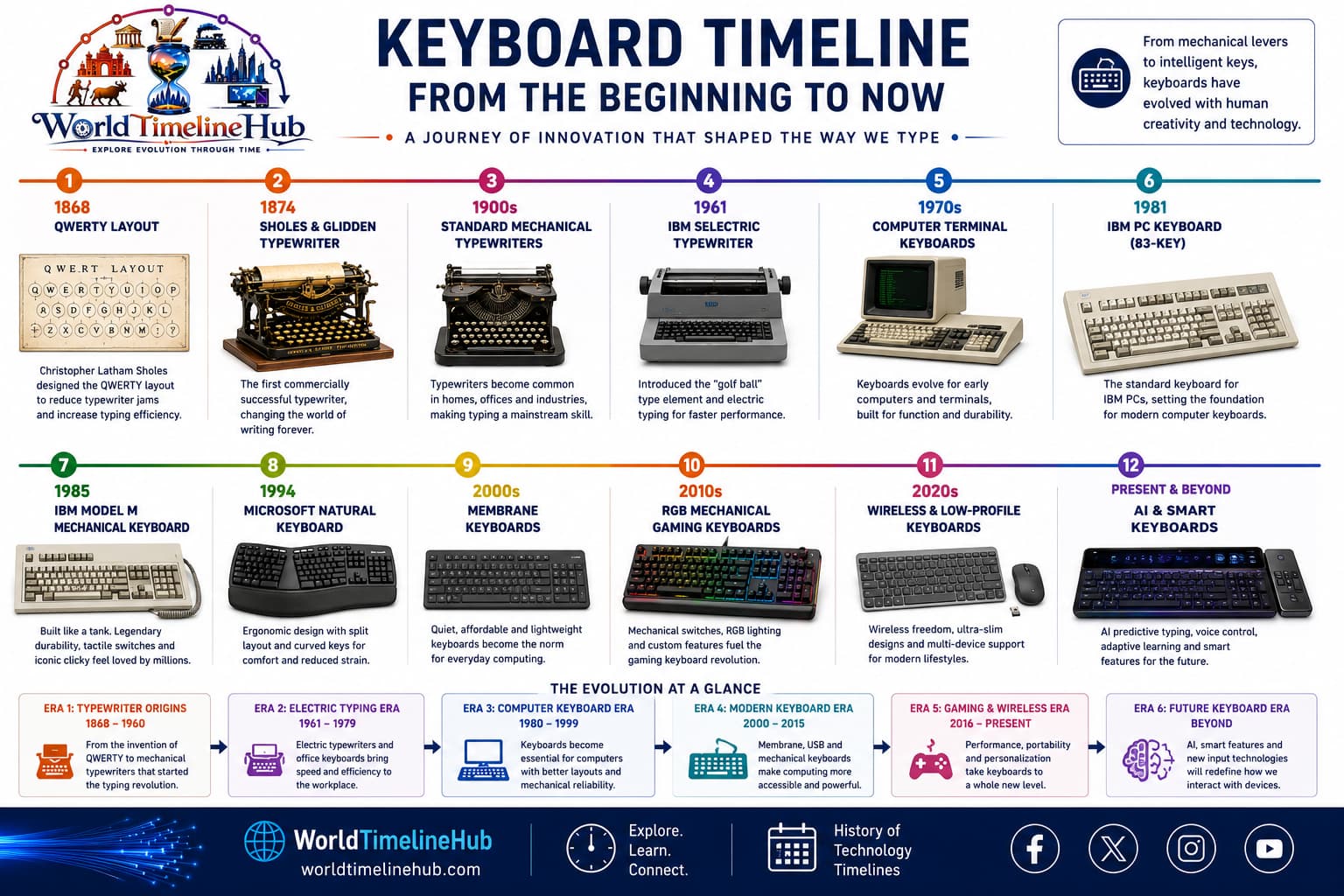
From typewriter keys and teletype terminals to mechanical switches, membrane boards, and wireless ergonomic designs—the keyboard shaped how humans talk to computers.
The keyboard descends from 19th-century typewriters. Christopher Latham Sholes helped popularize the QWERTY layout, and teletype machines later bridged typing to early computers. When personal computers arrived, the keyboard became the default text input for command lines, programming, and office work.
Big picture
Keyboard evolution in one view
Keyboards evolved from heavy mechanical typewriters into compact laptop chiclet keys, enthusiast mechanical switches, and low-profile wireless boards integrated with tablets and smart TVs.
Keyboard evolution: from mechanical typewriters to today’s PC, laptop, and enthusiast boards.
Typing Begins1870s – 1950s
Typewriter and Early Key Layouts
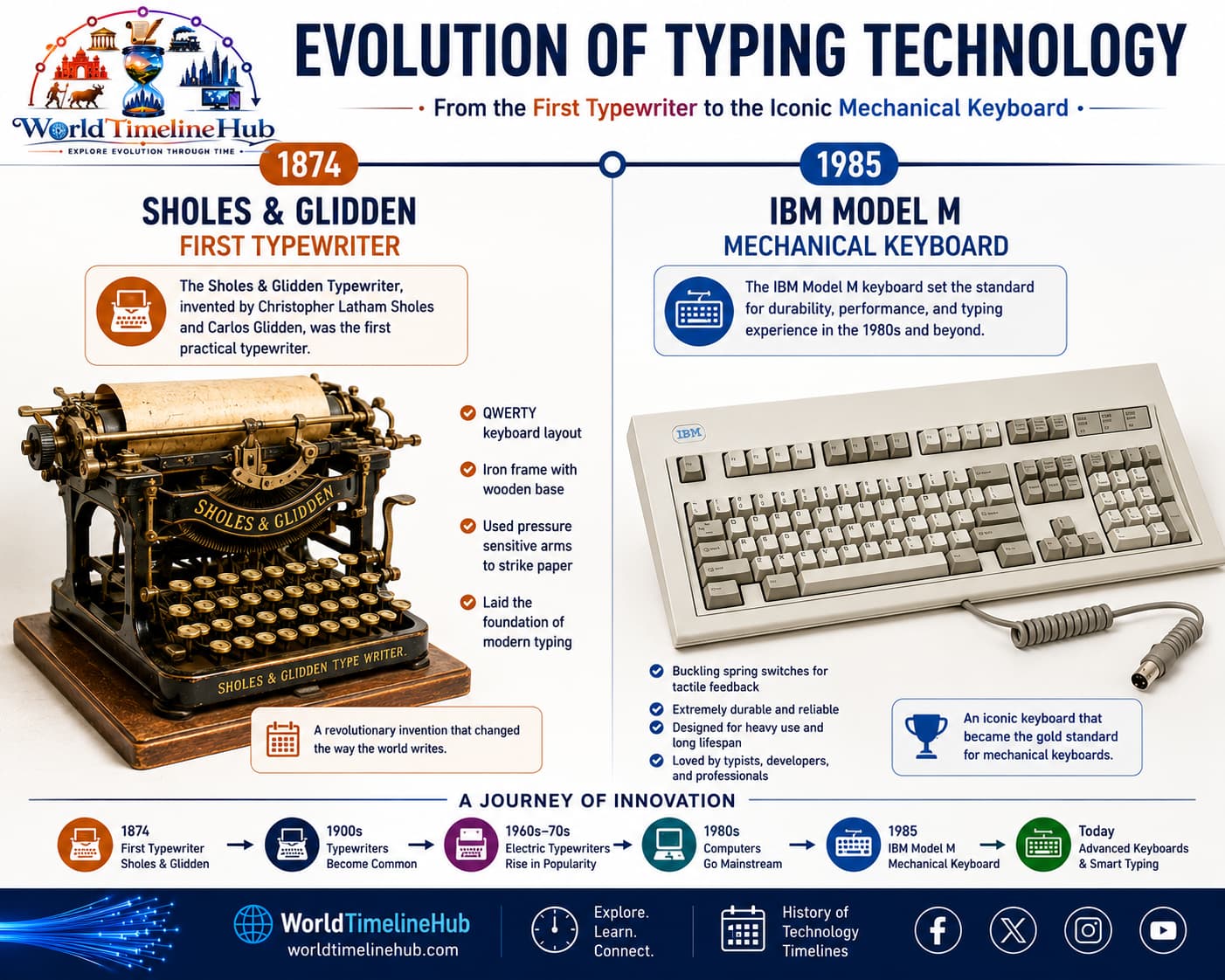
Typewriter era: mechanical keys and QWERTY layouts that still shape modern keyboards.
1873: Sholes & Glidden typewriter spreads QWERTY.
1890s–1920s: Remington and Underwood refine commercial typing.
1930s: Electric typewriters add motor-assisted keystrokes.
Before computers, humans entered text through mechanical typewriters—lever arms struck ink onto paper, and the QWERTY arrangement was designed to reduce jamming on early machines.
Technology Used
Mechanical levers: Each key triggered a metal arm.
QWERTY layout: Letter arrangement still used today.
Ink ribbon: Temporary character impression on paper.
Features
Physical feedback: Audible, tactile keystrokes.
Single function: Document creation, not programming.
Heavy desktop devices: No portability.
Computer Input1950s – 1970s
Teletypes and Computer Terminals
1950s–60s: Teletype machines connect to mainframes.
1970s: Video terminals replace paper teletypes.
Keyboards become the standard operator interface for batch and interactive systems.
Teletypes translated keystrokes into electrical signals sent to mainframes—operators typed commands and received printed or on-screen responses, establishing the keyboard as the primary computer input.
Technology Used
ASCII encoding: Standard character codes.
Serial communication: Characters sent one by one.
Monochrome CRT terminals: Green/amber text displays.
Features
Command-line workflows: Text-first interaction.
Shared terminals: Multi-user lab and datacenter use.
Fixed layouts: Limited ergonomic variation.
PC Standard1980s – 1990s
Personal Computer Keyboard Era
PC keyboard era: standardized desktop layouts, membrane switches, and dedicated ports like PS/2.
1981: IBM PC Model M lineage influences desktop keyboards.
1980s: Function keys and numeric keypads become common.
1990s: Windows and Mac keyboards add modifier and media keys.
The PC boom standardized full-size layouts with function rows, arrow clusters, and numeric pads—membrane switches under plastic keycaps made mass production affordable for homes and schools.
Technology Used
Membrane switches: Rubber dome contact layers.
PS/2 and AT connectors: Dedicated keyboard ports.
Scissor and dome mechanisms: Cost-effective key travel.
Features
104-key layouts: Familiar desktop form factor.
Productivity focus: Spreadsheet and word processing.
Wired reliability: Simple plug-and-type setup.
Portable Typing2000 – 2012
Laptop and Chiclet Keyboard Generation
Ultraportable laptops shrink key travel and width.
Chiclet-style flat keys appear on netbooks and MacBooks.
Backlit keys support low-light mobile work.
Mobility demanded thinner keys and tighter spacing—chiclet caps, short-travel scissor mechanisms, and integrated touchpads turned the keyboard into part of a clamshell portable package.
Cherry MX-style mechanical keyboards resurge with gamers and programmers.
Bluetooth and 2.4 GHz wireless boards cut cable clutter.
Hot-swappable and RGB models grow in enthusiast markets.
Users rediscovered tactile mechanical switches while wireless protocols made clean desks practical—custom layouts, programmable layers, and per-key lighting turned keyboards into personal tools.
Multi-device pairing: One board for PC, tablet, phone.
AI autocomplete: Predictive and generative text aids.
Features
Ergonomic splits: Reduced strain for long sessions.
Hybrid workflows: Voice + keyboard + touch.
Sustainable materials: Recycled plastics and repairable designs.
Keyboard Timeline Summary
Major milestones from typewriters to modern mechanical and wireless keyboards—use this table as a quick map before the detailed events, switches, and comparisons below.
Year / Era
Milestone
1873
QWERTY typewriter layout popularized
1950s–60s
Teletypes link typing to computers
1981
IBM PC defines desktop keyboard expectations
1990s
Windows/Mac multimedia keys
2000s
Laptop chiclet keyboards mainstream
2010s
Mechanical keyboard enthusiast revival
2020s
Wireless, low-profile, and AI-assisted typing
Key Keyboard Historical Events
Beyond the main era cards, these milestones shaped how people type—from commercial typewriters and electric machines to PC standards, ergonomics, and modern mechanical gaming boards.
Event
Year
Why it matters
First commercial typewriter
1874
Sholes & Glidden; introduced QWERTY
Electric typewriter
1930s
IBM Electromatic; motor-assisted keys
First computer keyboard terminal
1956
MIT’s Whirlwind used keyboard input
IBM Model F
1981
IBM PC’s capacitive buckling spring keyboard
IBM Model M
1985
Legendary mechanical keyboard; set industry standard
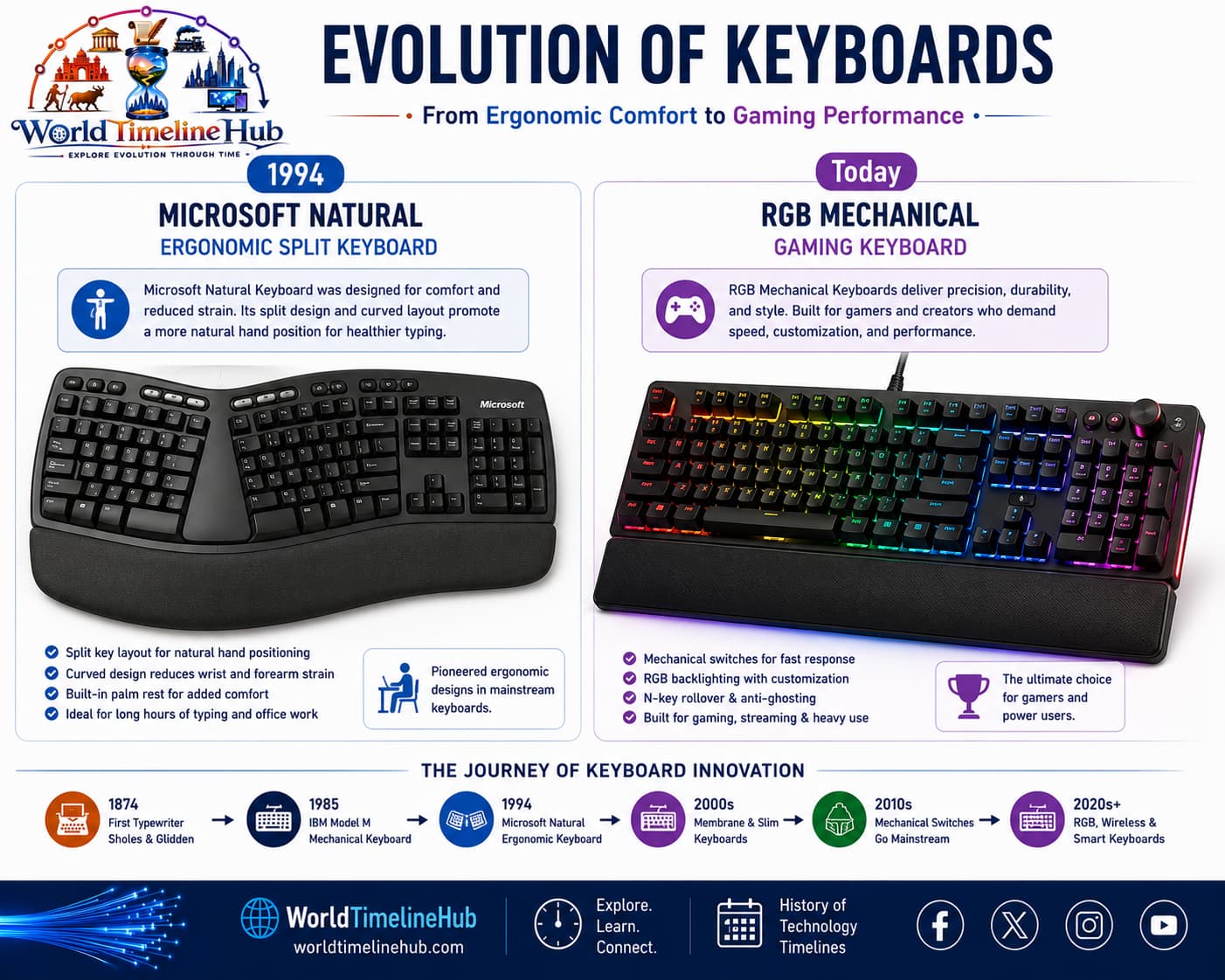
Microsoft Natural Keyboard
1994
First mass-market ergonomic split keyboard
Cherry MX switch patent
1980s
Standard for modern mechanical switches
First Bluetooth keyboard
2000s
Wireless connectivity mainstream
Razer BlackWidow
2010
Popularized mechanical switches for gaming
Wooting one (analog)
2016
First analog optical keyboard
Keyboard “Firsts” at a Glance
Quick reference for landmark “first” achievements in typing hardware—from patents and shift keys to wireless links and enthusiast features.
First
Year
Achievement
First typewriter patent
1868
Christopher Sholes patent
First keyboard with Shift key
1878
Remington No. 2
First computer keyboard
1946
ENIAC (modified typewriter)
First keyboard with function keys
1965
IBM 2260 terminal
First keyboard with numeric keypad
1970s
Dedicated data entry terminals
First wireless keyboard
1990s
Infrared-based early models
First RGB mechanical keyboard
2014
Corsair K70 RGB
First hot-swappable mechanical keyboard
2015
Team Wolf / Zhuque
Common Keyboard Layouts
Letter and symbol positions vary by country and language. Most of the world still defaults to QWERTY, but alternatives persist for ergonomics and local scripts.
Layout
Region / Use
Notes
QWERTY
Global default
Originated on typewriters
AZERTY
France, Belgium
Different letter positions
QWERTZ
Germany, Central Europe
Y and Z swapped vs QWERTY
Dvorak
Alternative ergonomic
Less finger travel design
JIS / ISO
Japan / Europe
Enter and modifier key shapes differ
Keyboard Switch Types Compared
Switch design determines feel, noise, speed, and cost. Office boards often use membrane or scissor mechanisms; enthusiasts and gamers favor mechanical, optical, or magnetic options.
Switch Type
Actuation Force
Tactile
Clicky
Common Use
Membrane (rubber dome)
60–80g
Mushy
No
Office, budget boards
Scissor-switch
50–70g
Light
No
Laptops, slim keyboards
Cherry MX Red
45g
Linear
No
Gaming
Cherry MX Brown
55g
Tactile
No
Typing, general use
Cherry MX Blue
60g
Tactile
Yes
Typing enthusiasts
Optical (Gateron)
35–65g
Linear/Tactile
Optional
Fast gaming response
Magnetic (Hall effect)
Adjustable
Linear
No
High-end gaming
Buckling spring
70g
Tactile
Yes
IBM Model M (vintage/enthusiast)
Keyboard Sizes and Form Factors
Not every desk needs a full 104-key board. Smaller layouts drop keys you rarely use, while standalone numpads and macro pads add focused functionality.
Size
Keys
Layout
Best for
Full size (100%)
104–108
Includes numpad
Data entry, accounting
Tenkeyless (TKL / 80%)
87–88
No numpad
Gaming, programmers
75%
80–84
Compact, function row condensed
Space-saving desktop
65%
67–68
No function row, has arrows
Portable, minimalist
60%
61
No arrows, no function row
Custom builders
40%
40–50
Multiple layers, no number row
Extreme minimalists
Numpad
20–24
Standalone numeric block
Data entry add-on
Macro pad
4–16
Programmable small keypad
Shortcuts, streaming
Keyboard Pioneers and Inventors
Layouts, switches, and ergonomics reflect decades of inventors, manufacturers, and research labs—not one company alone.
Person / Company
Contribution
Christopher Latham Sholes
QWERTY layout, first practical typewriter
James Densmore
Commercialized Sholes’ typewriter
IBM (Thomas Watson Sr.)
Electric typewriters, Model M keyboard
August Dvorak
Dvorak ergonomic layout (1936)
Cherry (Walter Cherry)
Cherry MX mechanical switches
Xerox PARC
Early GUI keyboards with modifier keys
Microsoft Hardware
Ergonomic Natural Keyboard (1994)
Logitech
First successful wireless keyboards
Then vs Now: Typing Experience
Compare a typical 1980s–90s desktop keyboard with a modern board—same QWERTY idea, but very different materials, connectivity, and customization.
Metric
Then (1980s–90s)
Now (2020s)
Typical keyboard
IBM Model M (heavy, wired)
Mechanical or membrane, wireless
Key travel
4–5 mm (deep)
1.5–4 mm (varies)
Weight
2–3 kg (metal backplate)
0.5–1.5 kg (plastic/aluminum)
Connectivity
PS/2 or AT (dedicated port)
USB, Bluetooth, 2.4 GHz dongle
Backlighting
None (or big keyboard lamps)
RGB, per-key programmable
Programmability
None (fixed layout)
QMK/VIA, macro layers
Price (entry level)
$100+ (Model M MSRP)
$30–50 (decent mechanical)
Ergonomics
Flat, no wrist rest standard
Split, tenting, wrist rests common
Future Keyboard Predictions
Speculative roadmap—not certainties, but directions researchers and manufacturers are exploring for feel, form factor, and how we enter text.
2025–2027: Magnetic/Hall effect switches become mainstream in gaming keyboards
2026–2028: Flexible/foldable displays integrated into keyboard surfaces
2028–2030: AI-driven predictive typing and real-time language translation
2030s: Haptic key surfaces that change texture and layout per application
2035+: Neural input (EEG) as alternative to physical typing for some users
Keyboard Glossary
Terms you will hear when comparing switches, building custom boards, or shopping for gaming and office keyboards.
Term
Definition
Actuation point
Distance key travels before registering a press
Chiclet key
Flat, square keys with space between them (island style)
Debounce
Eliminates multiple false signals from a single key press
Hot-swappable
Allows switch replacement without soldering
Key rollover
Number of simultaneous key presses recognized (NKRO = unlimited)
Keycap profile
Shape and height of keycaps (OEM, Cherry, SA, DSA)
Linear switch
Straight, smooth keystroke without tactile bump
Tactile switch
Small bump to indicate actuation point
N-key rollover (NKRO)
Keyboard can register any number of keys at once
India spotlight
Keyboard adoption in India
India's typing culture grew through typewriter training institutes, government clerical exams, PC labs in schools, and IT services workplaces that standardized QWERTY English input alongside regional language tools.
1970s–80s
Typewriter training
Commercial typing skills spread through institutes and office jobs.
1990s
PC labs in schools
QWERTY keyboards introduced millions of students to computing.
2000s
IT and BPO workplaces
High-volume English typing became an economic skill.
2010s+
Regional language input
Transliteration and Indic layouts expanded beyond English-only typing.
Test Your Knowledge
20 quick questions from the keyboard timeline. Click each question to reveal the answer.
Answer: QWERTY.
Answer: Teletype (TTY) terminal.
Answer: Membrane (rubber dome).
Answer: IBM PC.
Answer: American Standard Code for Information Interchange.
Answer: Tactile feedback or durability (either acceptable).
Jump to any other technology timeline on WorldTimelineHub.
Disclaimer: This content is AI-generated for educational purposes and may contain errors or outdated details. For correct and authoritative information, please refer to official and reliable sources such as government publications, manufacturers, museums, and academic references.