Douglas Engelbart demonstrated a mouse in 1968. Xerox PARC paired it with windowed workstations, and Apple brought it to consumers with the Macintosh, making pointing as central as typing.
The sections below trace that path from military trackballs through ball mice, scroll wheels, optical and laser sensors, wireless gaming designs, and today’s hybrid touch, pen, and assistive input.
Big picture
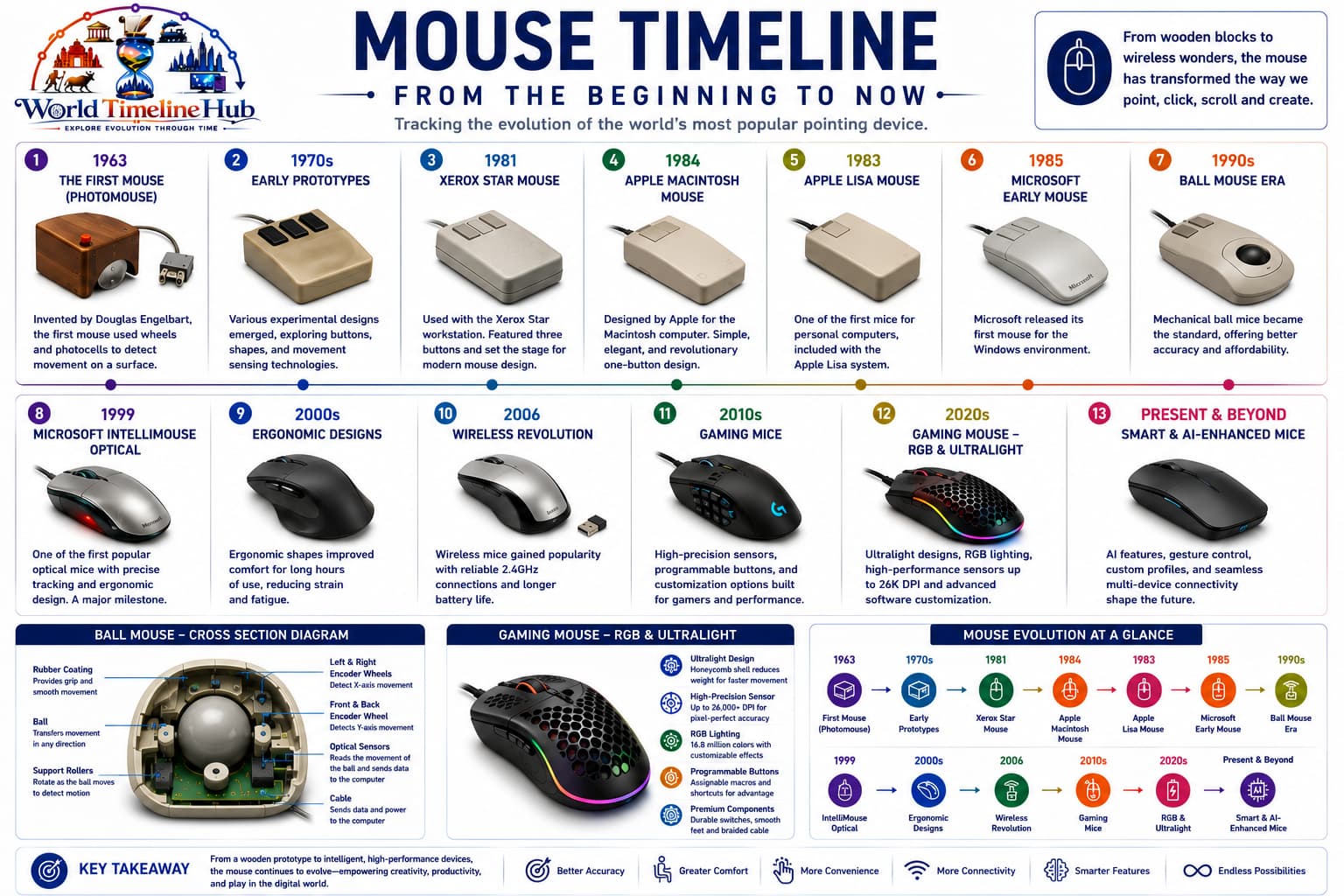
Mouse evolution in one view
Pointing hardware followed GUIs through ball mice, scroll wheels, laser optics, and low-latency wireless links for larger screens and faster games.
Mouse evolution: from early trackballs and GUI prototypes to modern optical and wireless mice.
Radar Input1940s - 1960s
Trackballs Before the Mouse
Before home computers, operators steered cursors with trackballs built into radar and plotting consoles. The same ball-and-encoder idea later appeared inside the first computer mice.
Early trackballs: ball-driven pointers on military and research workstations.
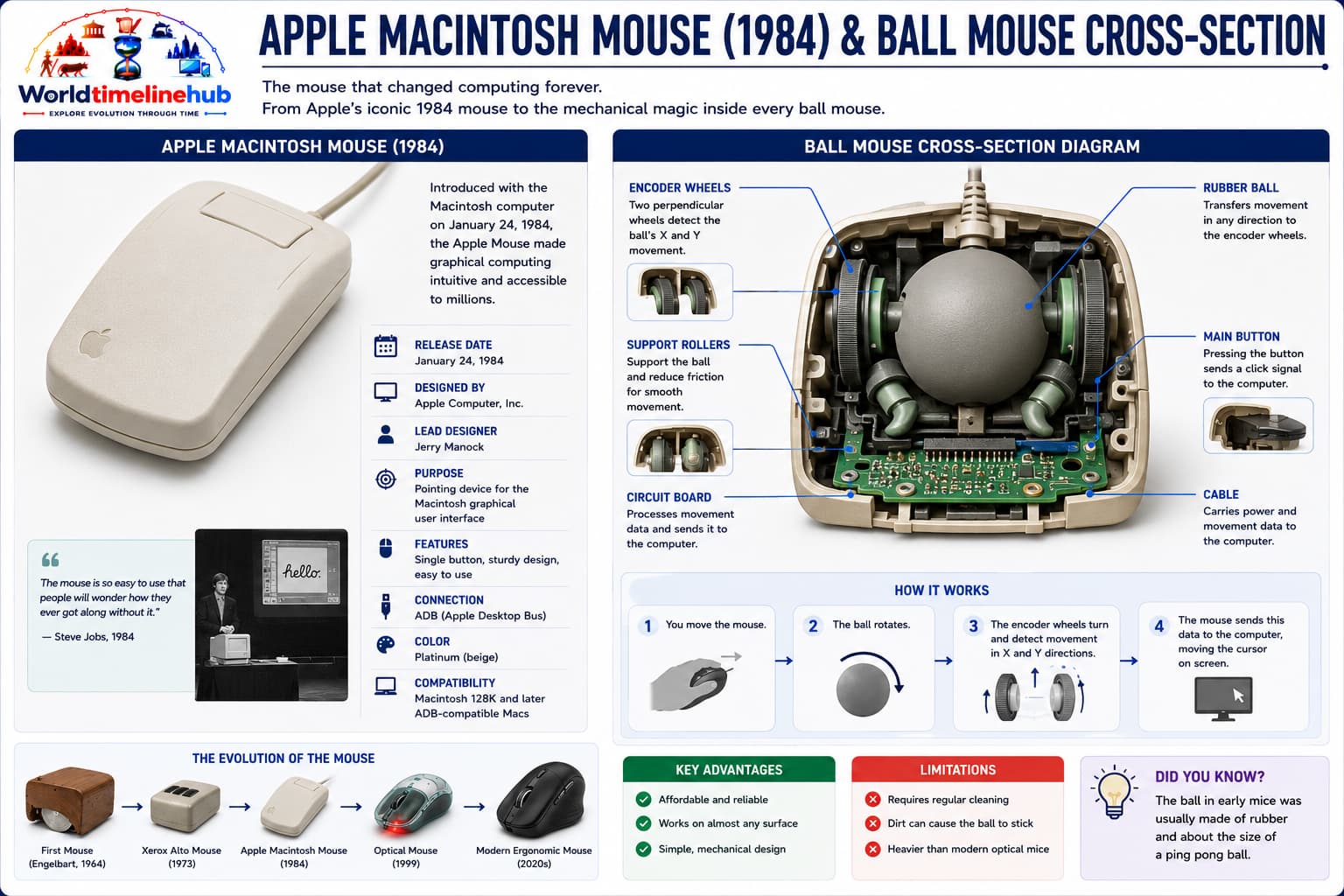
Ball mice: rubber balls and rollers translated hand motion into cursor movement for decades.
Trackballs guide radar and plotting consoles.
Rolling balls map hand motion to X/Y.
Encoders prove continuous pointing.
Technology Used
Ball encoders: Rotation to pulses.
Fixed consoles: Built into workstations.
Analog interfaces: Early signal paths.
Features
Specialized: Not consumer devices.
Two axes: Core pointing model.
Heavy hardware: Room-scale systems.
GUI Partner1960s - 1970s
Engelbart and Xerox GUI Mice
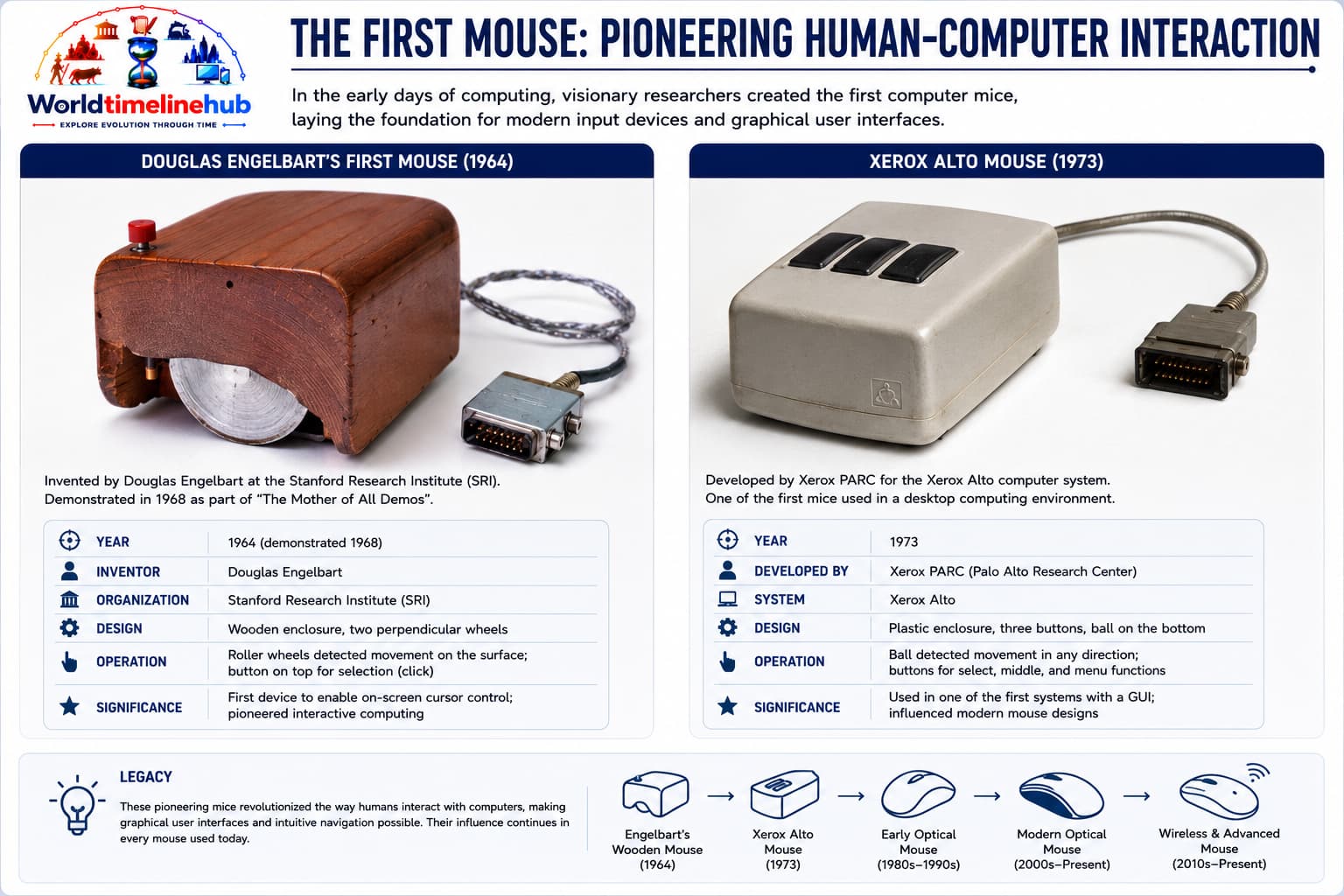
Douglas Engelbart’s team at SRI and engineers at Xerox PARC proved that a handheld pointer could edit text, open menus, and move windows on a bitmapped screen—ideas that still define desktop computing.
1968: Mother of All Demos shows mouse plus hypertext.
1973: Xerox Alto uses a mouse daily.
Multi-button designs explore select and menu models.
Technology Used
Ball mice: Roller encoders inside shell.
Serial links: Workstation wiring.
CRT GUIs: Windows and menus.
Features
Direct manipulation: Visible object editing.
High cost: Lab-only volumes.
Menu bars: Pointer-driven apps.
Mass Market1980s - 1990s
Macintosh and Windows Mouse Era
Apple and Microsoft made the mouse a standard accessory for millions of homes and offices. Scroll wheels and multi-button designs turned pointing into everyday navigation for documents, desktops, and the early web.
1984: Macintosh bundles mouse with OS.
Windows makes two-button mice mainstream.
Mouse pads and ball cleaning become common.
Technology Used
PS/2 port: PC mouse connector.
Rubber ball: Internal rollers.
Scroll wheel: Third axis input.
Features
Desktop publishing: Graphics tools grow.
Right click: Context menus.
Affordable plastics: Global accessory market.
Sensor Leap2000 - 2012
Optical Mice and USB
Camera-based sensors eliminated dirt-prone rubber balls, while USB gave one cable and automatic drivers for most operating systems. Ergonomic shapes and higher DPI followed larger monitors and longer work sessions.
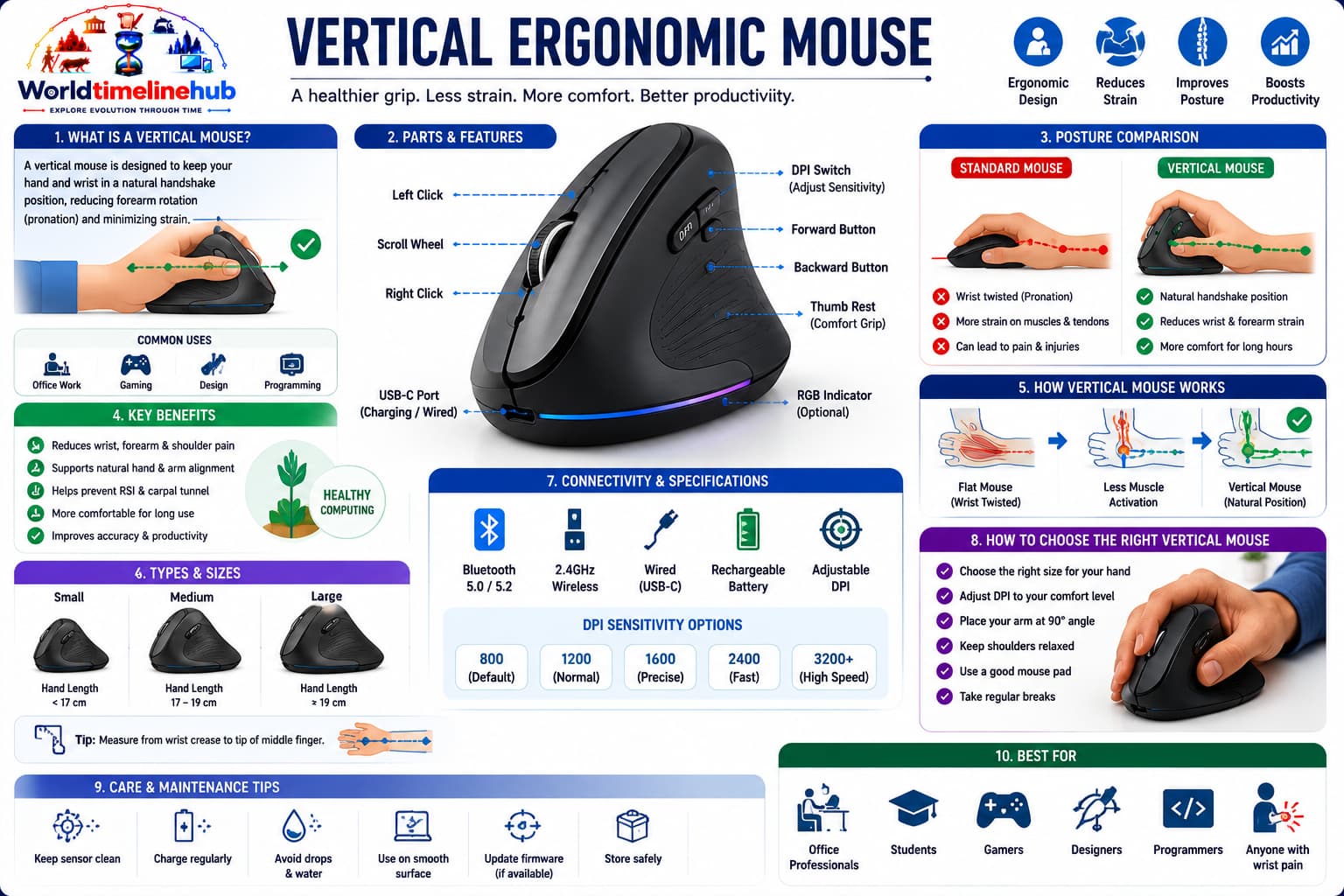
Optical and ergonomic mice: LED/laser sensors, USB plug-and-play, and vertical grips for comfort.
LED and laser sensors replace internal balls.
USB HID becomes universal plug-and-play.
Higher DPI supports large LCD monitors.
Technology Used
Optical chip: Surface texture tracking.
USB HID: Standard drivers.
DPI buttons: Sensitivity presets.
Features
Less maintenance: No roller grime.
Design work: Fine control.
Gaming brands: Performance focus.
Low Latency2013 - 2020
Wireless and Gaming Mice
Proprietary 2.4 GHz wireless rivaled wired lag for games, and brands competed on weight, sensor DPI, polling rate, and programmable side buttons for MMO and FPS players.
2.4 GHz dongles rival wired latency.
Lightweight shells target esports.
Software stores per-game macros.
Technology Used
2.4 GHz: Low-latency links.
Li-ion power: Rechargeable cells.
Macro tools: Button remapping.
Features
Esports: Sub-80g designs.
RGB accents: Peripheral style.
Cross-platform: Profile utilities.
Hybrid Input2021 - Present
Touchpads, Pens, and Assistive Pointers
Laptops normalized precision touchpads with gestures, while pens, trackballs, and experimental eye control offer alternatives for art, accessibility, and mixed-reality work—without replacing the desk mouse entirely.
Precision touchpads add gestures on laptops.
Stylus tablets compete for artists.
Eye tracking aids accessibility experiments.
Technology Used
Touchpads: Multi-finger gestures.
Pens: Pressure input.
Assistive AI: Cursor stabilization.
Features
Accessibility: Adaptive hardware.
Hybrid laptops: Multiple inputs.
Repairable: Swappable parts.
Mouse Timeline Summary
Major milestones from trackballs to wireless optical mice—use this table as a quick map before the detailed events, sensors, and comparisons below.
Year / Era
Milestone
1968
Engelbart mouse demo
1984
Macintosh mouse
1996
Scroll wheel mainstream
2000s
Optical sensors
2010s
Wireless gaming
2020s
High DPI lightweight mice
Key Mouse Historical Events
Beyond the main era cards, these moments shaped pointing devices from military trackballs to consumer GUIs, scroll wheels, optical sensors, and esports-grade wireless mice.
Event
Year
Why it matters
First trackball (radar plotting)
1946
Used in Royal Canadian Navy’s DATAR system
First computer mouse prototype
1964
Engelbart’s wooden shell with two wheels
“The Mother of All Demos”
1968
Engelbart shows mouse with hypertext & GUI
Xerox Alto (first PC with mouse)
1973
Pioneered GUI with mouse as default
Apple Lisa
1983
First commercial computer with bundled mouse
Apple Macintosh
1984
Made mouse mainstream for consumers
First scroll wheel mouse
1996
Microsoft IntelliMouse introduced
First optical mouse (no pad needed)
1999
Microsoft IntelliMouse Explorer
Logitech MX Revolution
2006
First micro-gear dual-mode scroll wheel
First wireless gaming mouse
2010s
Logitech G series / Razer Mamba
First ultralight mouse (sub-60g)
2019
Glorious Model O / Finalmouse
Mouse “Firsts” at a Glance
Landmark “first” achievements in mouse hardware, connectivity, and gaming features.
First
Year
Achievement
First rolling-ball mouse
1972
Xerox PARC (Bill English refinement)
First mouse with 2 buttons
1972
Xerox Alto mouse
First mouse with 3 buttons
1980s
Unix workstations
First USB mouse
1998
Microsoft IntelliMouse with USB
First laser mouse
2004
Logitech MX 1000
First Bluetooth mouse
2005
Logitech MX 900
First gaming mouse with adjustable DPI
2000s
Razer Boomslang
First mouse with OLED display
2014
SteelSeries Rival 700
First magnetic charging mouse
2019
Logitech G PowerPlay
Mouse Types Compared
Different form factors and tracking technologies suit office work, gaming, CAD, and ergonomic needs.
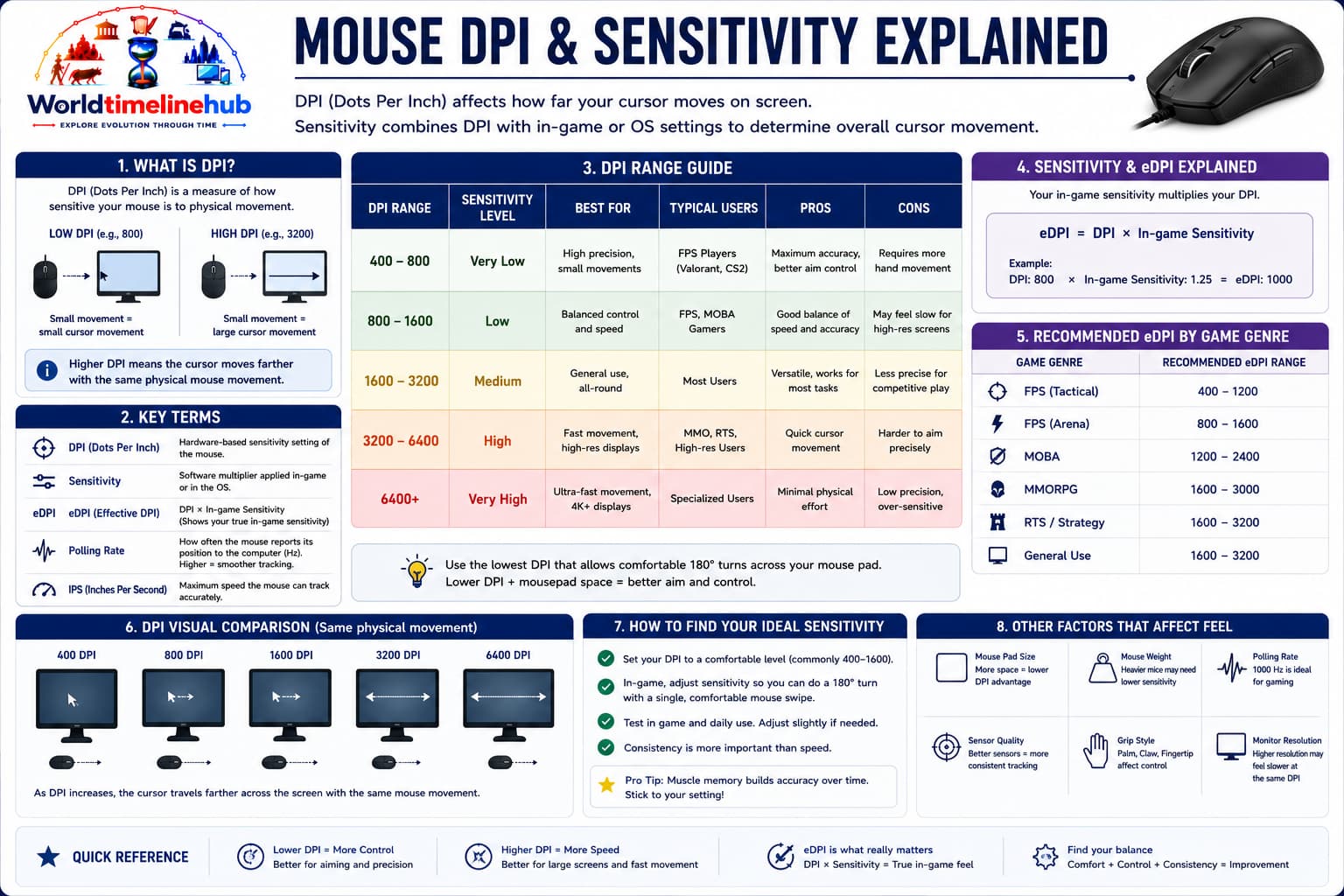
Mouse types and sensitivity: how form factor and DPI match different screens and tasks.
Type
Tracking
Typical use
Ball
Rollers
Vintage PCs
Optical
LED
Office
Laser
Laser chip
Mixed surfaces
Trackball
Fixed ball
CAD
Vertical
Optical
Ergonomics
DPI Evolution: Mouse Sensitivity Over Time
DPI (dots per inch) measures how far the cursor moves per inch of hand motion. Higher resolutions and gaming demands pushed sensitivity far beyond early ball mice.
Era
Typical DPI
Mouse Type
Display Resolution
1980s
100–200 DPI
Ball mouse
640×480 to 800×600
1990s
200–400 DPI
Ball mouse
800×600 to 1024×768
2000–2005
400–800 DPI
Optical mouse
1024×768 to 1280×1024
2005–2010
800–1600 DPI
Laser mouse
1280×1024 to 1680×1050
2010–2015
1600–4000 DPI
Gaming optical
Full HD (1920×1080)
2015–2020
4000–16000 DPI
High-end gaming
1440p to 4K
2020–Present
16000–26000+ DPI
Ultra-precision sensors
4K to 8K displays
Mouse Sensor Technology Evolution
How mice detect movement evolved from mechanical rollers to camera-based optical chips and specialized gaming sensors with extreme DPI and low power draw.
Sensor Type
Era
How It Works
Pros & Cons
Mechanical (Ball)
1970s–2000s
Rubber ball turns rollers with encoding wheels
Cheap but needs cleaning, less accurate
Early Optical (Special pad)
1980s–1990s
Required patterned mouse pad for tracking
Better accuracy, pad dependent
LED Optical (Surface independent)
1999+
Camera takes 1500+ pictures/second of surface
No moving parts, works on most surfaces
Laser
2004+
Uses laser instead of LED, higher resolution
Works on glossy surfaces, more precise
Gaming Optical (HERO/Focus+)
2016+
High-DPI, low power consumption
Competitive tracking, long battery life
Magnetic (Hall effect)
2020s
Contactless magnetic sensors
Very durable, no wear, high precision
Connection Standards
How a mouse talks to the PC changed from serial and PS/2 ports to USB and wireless links optimized for office convenience or gaming latency.
PS/2: Legacy PC port.
USB: Modern default.
Bluetooth: Multi-device pairing.
2.4 GHz dongle: Low-latency wireless.
Mouse Pioneers and Key Contributors
Researchers, labs, and companies turned a lab prototype into an everyday tool for billions of GUI users.
Compare a typical 1980s–90s ball mouse with a modern wireless gaming or office optical mouse.
Metric
Then (1980s–90s)
Now (2020s)
Tracking type
Mechanical (rubber ball)
Optical or laser
Average DPI
100–200 DPI
16000–26000+ DPI
Connection
Serial or PS/2
USB, Bluetooth, 2.4 GHz dongle
Buttons
2–3 buttons
5–8+ programmable buttons
Cleaning needed
Weekly (ball and rollers)
Rarely (just exterior)
Price (entry level)
$20–40 (1990s dollars)
$5–15 (basic optical)
Gaming features
None
RGB, ultralight, high polling rate
Battery life (wireless)
N/A (mostly wired)
Months to years (2.4 GHz)
Future Mouse Predictions
Speculative roadmap—not certainties, but directions for sensors, connectivity, haptics, and accessibility-focused input.
2025–2027: 100,000+ DPI sensors for 8K multi-monitor setups
2026–2028: Li-Fi (light-based) communication for ultra-low latency
2028–2030: Haptic feedback with texture simulation on mouse surface
2030s: Eye-tracking + mouse hybrid for accessibility and productivity
2035+: Neural cursor control (EEG) as alternative input for disabled users
Mouse Glossary
Terms common in reviews, gaming settings, and driver software when tuning a mouse.
Term
Definition
DPI (Dots Per Inch)
Sensitivity measure — higher DPI = faster cursor movement
Polling rate
How often mouse reports position to PC (Hz; typical 125–1000 Hz)
IPS (Inches Per Second)
Max speed mouse can track without losing accuracy
Acceleration
Cursor speed multiplies with faster physical movement
Lift-off distance
Height at which sensor stops tracking when mouse is lifted
Angle snapping
Software correction that straightens mouse lines
Debounce time
Delay between click registrations to avoid double-click errors
Omron / optical switch
Mechanical vs light-based switch for main buttons
India spotlight
Mouse adoption in India
Cyber cafes, IT training, and design studios spread mouse-driven GUIs alongside keyboard skills across India.
1990s
Cyber cafes
Windows PCs introduced mouse browsing to students.
2000s
IT training centers
Office software courses taught click workflows.
2010s
Affordable USB mice
Local brands scaled optical accessories.
2020s
Gaming peripherals
Esports and streaming boosted premium mice.
Ongoing
Laptop touchpads
Touchpads complement mice in education.
Test Your Knowledge
20 quick questions from the mouse timeline. Click each question to reveal the answer and check what you remember from the eras, tables, and India spotlight above.
Answer: Douglas Engelbart.
Answer: Xerox PARC.
Answer: Apple Macintosh.
Answer: Vertical scrolling.
Answer: Optical or laser sensors.
Answer: USB.
Answer: Movement sensitivity per inch.
Answer: Bluetooth or 2.4 GHz dongle.
Answer: Mouse pad.
Answer: Radar and military consoles.
Answer: Context menu.
Answer: Graphical User Interface.
Answer: Varied or glossy desks (context dependent).
Answer: Wrist strain.
Answer: Touchpad.
Answer: Drawing and design.
Answer: Xerox Alto.
Answer: USB HID.
Answer: Esports / fast FPS.
Answer: More precision, wireless freedom, and hybrid options.
Classroom activity
Students Tasks
Use these 10 prompts for discussion, projects, or classroom presentations.
GUI historySensorsErgonomicsGaming
Summarize Engelbart's 1968 demo in five sentences.
Compare ball versus optical tracking.
Explain why scroll wheels mattered for the web.
Label the parts of a modern mouse in a diagram.
List ergonomic habits for long computer use.
How did Macintosh change consumer expectations?
Research one accessibility pointing device.
Why do gamers want high DPI and low weight?
Describe mouse adoption in Indian cyber cafes.
Predict one future pointing technology.
Continue exploring
Browse related technology timelines and compare how input devices, software, and networks evolved together.
Jump to any other technology timeline on WorldTimelineHub.
Disclaimer: This content is AI-generated for educational purposes and may contain errors or outdated details. For correct and authoritative information, please refer to official and reliable sources such as government publications, manufacturers, museums, and academic references.