The motherboard is the backbone of every PC — it connects the CPU, memory, storage, and expansion cards.
From hobbyist S-100 backplanes to standardized ATX layouts and PCIe 5.0 AI-ready platforms, follow how board
design shaped personal computing.
1970s → PresentISA → PCIeATX → ITX
What Is a Motherboard?
A motherboard (mainboard or system board) is the printed circuit board that holds the CPU socket, RAM
slots, chipset, power connectors, and expansion interfaces. It routes signals and power between
components so the computer operates as one system. Before integrated boards, hobbyists stacked separate
cards on a shared backplane — the ancestor of today’s single PCB design.
Big picture
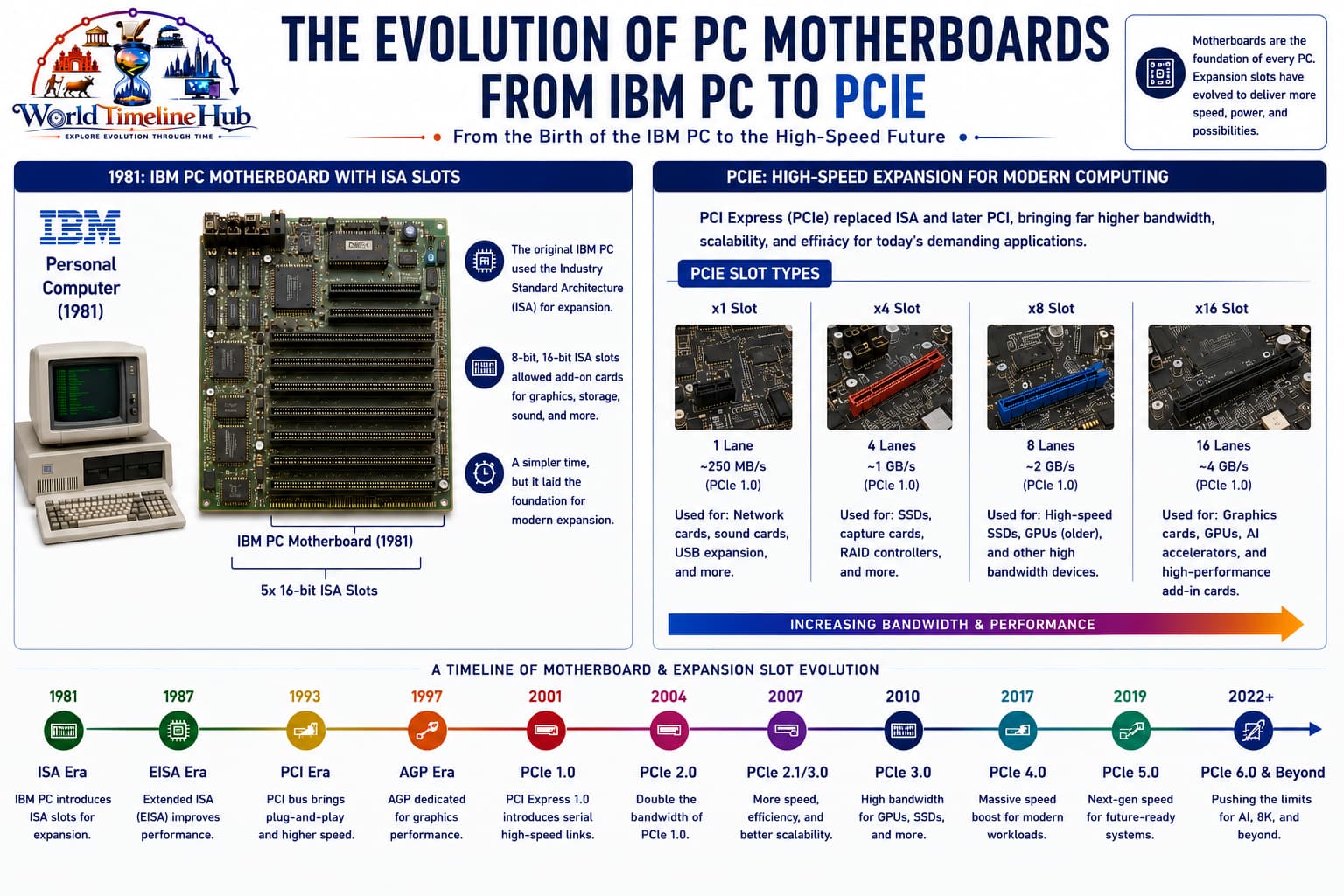
Motherboard evolution in one view
Standards turned chaotic hobby wiring into interchangeable PCs. Bus architectures (ISA, PCI, PCIe),
form factors (AT, ATX, ITX), and firmware (BIOS → UEFI) let builders swap CPUs, GPUs, and storage
without redesigning the entire machine.
PCIe 5.0 x16 + multiple M.2: Heat spreaders on SSD slots become standard.
NPU-ready platforms: CPUs with AI engines; boards advertise Copilot+ compatibility.
Features
BIOS flashback: Update firmware without CPU installed — easier for new builders.
Robust VRM cooling: Heavy heatsinks for 200 W+ CPUs.
Ecosystem lock-in: Socket AM5, LGA 1700/1851, etc. — CPU generation tied to board chipset.
Motherboard Timeline Summary
Major standards and form factors from hobby buses to modern ATX platforms—use this table as a quick map before the detailed events, chipsets, and comparisons below.
Year / Era
Milestone
1975
S-100 bus on Altair-style kit computers
1981
IBM PC integrated motherboard with ISA slots
1984
PC AT — 16-bit ISA and AT layout
1992
PCI expansion bus introduced
1995
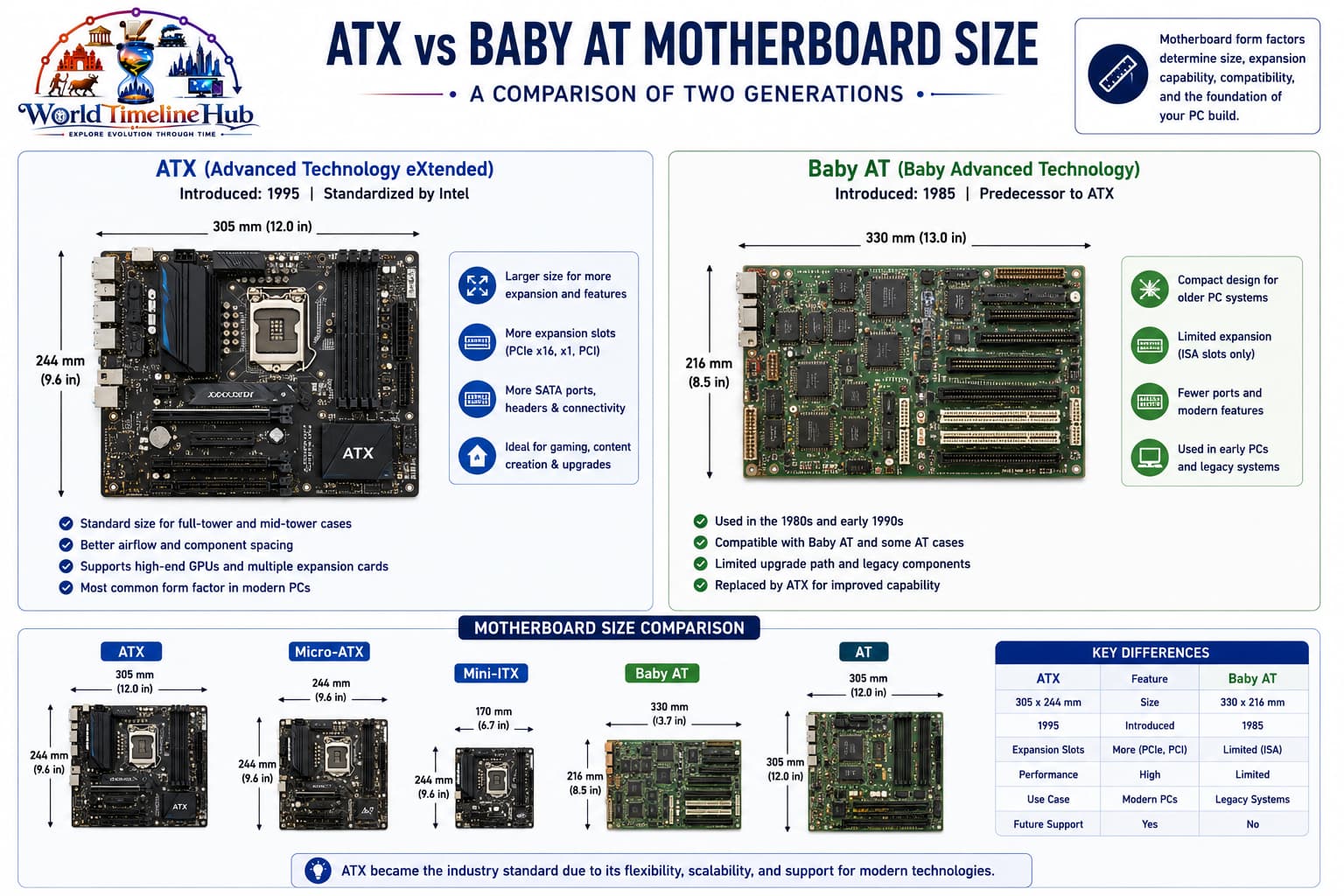
ATX form factor standardized
2004
PCI Express replaces parallel PCI for GPUs
2010s
UEFI, M.2 NVMe, CPU-integrated memory controllers
2020s
DDR5, PCIe 5, AI PC and chiplet platforms
Key Motherboard Historical Events
Beyond the main era cards, these milestones shaped how PCs connect CPUs, memory, graphics, and storage—from hobby buses to PCIe 5 and DDR5 platforms.
Event
Year
Why it matters
First S-100 bus specification
1975
Altair 8800; hobbyist computing begins
IBM PC motherboard (ISA slots)
1981
Standardized PC architecture
IBM PC AT (16-bit ISA)
1984
Expanded bus width, AT form factor
VESA Local Bus (VLB)
1992
First high-speed bus for graphics (32-bit, 33 MHz)
PCI bus introduced
1992
Plug and Play, 33 MHz parallel bus
Intel releases ATX specification
1995
Standardized board/case layouts for 25+ years
AGP (Accelerated Graphics Port)
1997
Dedicated graphics bus; precursor to PCIe
PCI Express 1.0
2003
Serial lanes replaced parallel buses
UEFI replaces legacy BIOS
2005+
Graphical setup, Secure Boot, GPT
M.2 / NVMe standard
2013
Direct PCIe SSDs without cables
PCIe 4.0
2017
Doubled bandwidth (16 GT/s per lane)
PCIe 5.0
2021
32 GT/s per lane; Gen5 SSDs arrive
DDR5 mainstream platforms
2021+
Higher bandwidth, on-die ECC
Motherboard “Firsts” at a Glance
Landmark “first” achievements in board design, expansion, connectivity, and enthusiast features.
First
Year
Achievement
First motherboard (integrated single PCB)
1976
Apple I (built on a single board)
First passive backplane
1975
Altair 8800 S-100 bus
First motherboard with onboard cache
1980s
Improves CPU memory access speeds
First motherboard with PCI slots
1992
Compaq Deskpro series
First consumer ATX motherboard
1995
Intel VS440FX
First motherboard with AGP slot
1997
Intel 440LX chipset
First motherboard with USB ports
1996
Intel 430TX chipset (USB 1.0)
First motherboard with PCIe x16 slot
2004
Intel 915/925 Express chipsets
First motherboard with M.2 slot
2013
ASUS, Gigabyte (Intel 8/9 series)
First motherboard with onboard RGB
2015+
MSI, ASUS Aura Sync era
First motherboard with PCIe 5.0
2021
Intel Z690 / AMD X670E
Form Factors at a Glance
Form factor defines board size, mounting holes, and how many expansion slots fit in a case—from full ATX towers to tiny mini-ITX builds.
Form Factor
Typical Use
Size Trend
AT / Baby-AT
1980s–90s desktops
Superseded by ATX
ATX
Standard tower PCs
Full-size, most expansion slots
microATX
Compact desktops
Smaller, fewer slots
mini-ITX
SFF, HTPC, portable builds
17 cm square — minimal footprint
E-ATX
Workstation / enthusiast
Extra width for more lanes and VRMs
Expansion Bus Evolution
Expansion buses connect add-in cards to the CPU and chipset—each generation traded parallel width for serial lanes and higher bandwidth.
Bus
Era
Key trait
S-100
1970s
Parallel hobby backplane, 8-bit
ISA
1980s–90s
PC-compatible 8/16-bit slots
PCI
1990s–2000s
33 MHz parallel, Plug and Play
AGP
1990s–2000s
Dedicated graphics port (replaced by PCIe)
PCIe
2004–present
Serial lanes, scalable bandwidth
Chipset Evolution (Intel Focus)
Chipsets route data between the CPU and peripherals. Intel’s generations introduced PCI, AGP, PCIe, SATA, USB, and DDR standards that defined each PC era.
Chipset Era
Year
Key Features
Intel 430FX (Triton)
1995
First PCI chipset, USB 1.0 support
Intel 440BX
1998
Legendary stability, AGP 2x, 100 MHz FSB
Intel 810/815
1999–2000
Integrated graphics, ATA/66/100
Intel 865/875
2003
Dual-channel DDR, SATA, AGP 8x
Intel 915/925
2004
First PCIe, LGA775, DDR2
Intel X38/X48
2007–2008
PCIe 2.0, DDR3 support
Intel Z77/Z87
2012–2013
SATA 6Gb/s, USB 3.0, M.2 later
Intel Z370/Z390
2017–2018
6-core mainstream, PCIe 3.0
AMD X570
2019
PCIe 4.0, DDR4, AM4 platform
Intel Z690/Z790
2021–2022
PCIe 5.0 + DDR5, LGA1700
AMD X670E
2022
PCIe 5.0 GPU + SSD, AM5 socket
CPU Socket Timeline (Desktop)
The CPU socket determines which processors fit a board. Desktop PCs moved from pin grids and slots to LGA packages with long-lived platforms like AM4 and AM5.
Socket
Pins
Intel/AMD
Years Active
Notable CPUs
Socket 7
321
Both
1994–1998
Pentium, K6
Slot 1
242
Intel
1997–1999
Pentium II/III (cartridge)
Socket 370
370
Intel
1999–2004
Pentium III, Celeron
Socket 478
478
Intel
2000–2004
Pentium 4, Celeron
Socket 775 (LGA)
775
Intel
2004–2012
Core 2 Duo, Pentium D
Socket AM2/AM3
940/941
AMD
2006–2016
Athlon 64, Phenom, FX
Socket 1151
1151
Intel
2015–2019
6th to 9th gen Core
Socket AM4
1331
AMD
2016–2025
Ryzen 1000 to 5000 series
Socket 1700 (LGA)
1700
Intel
2021–present
12th to 14th gen Core
Socket AM5
1718
AMD
2022–present
Ryzen 7000/8000/9000
Motherboard Pioneers & Manufacturers
Motherboard innovation came from kit pioneers, PC standards bodies, chipset makers, and board vendors that pushed overclocking, durability, and gaming features.
Company / Person
Contribution
Ed Roberts (MITS)
Altair 8800 — S-100 bus pioneer
IBM
First integrated motherboard (IBM PC)
Intel
ATX form factor, chipset design, PCIe
ASUS
First consumer motherboards (1989), overclocking leader
Compare a typical 1990s desktop board with a modern platform—same role as the PC’s backbone, but very different integration, speeds, and onboard features.
Metric
Then (1990s)
Now (2020s)
Form factor
Baby AT, early ATX
ATX, microATX, mini-ITX
Expansion slots
ISA + PCI (1–2 each)
PCIe 4.0/5.0 (x16, x4, M.2)
Chipset
Northbridge + Southbridge
Single PCH (Intel) or chiplet (AMD)
BIOS/UEFI
Text-mode BIOS, limited options
Graphical UEFI, mouse, flash without CPU
Storage ports
PATA (40-pin ribbon cables)
M.2 NVMe (no cables), SATA
VRM phases
3–4 phases
12–20 phases (for 200W+ CPUs)
Onboard features
Sound card optional
7.1 audio, Wi-Fi 6E, 2.5Gb LAN
Typical price (mainstream)
$50–80
$120–250
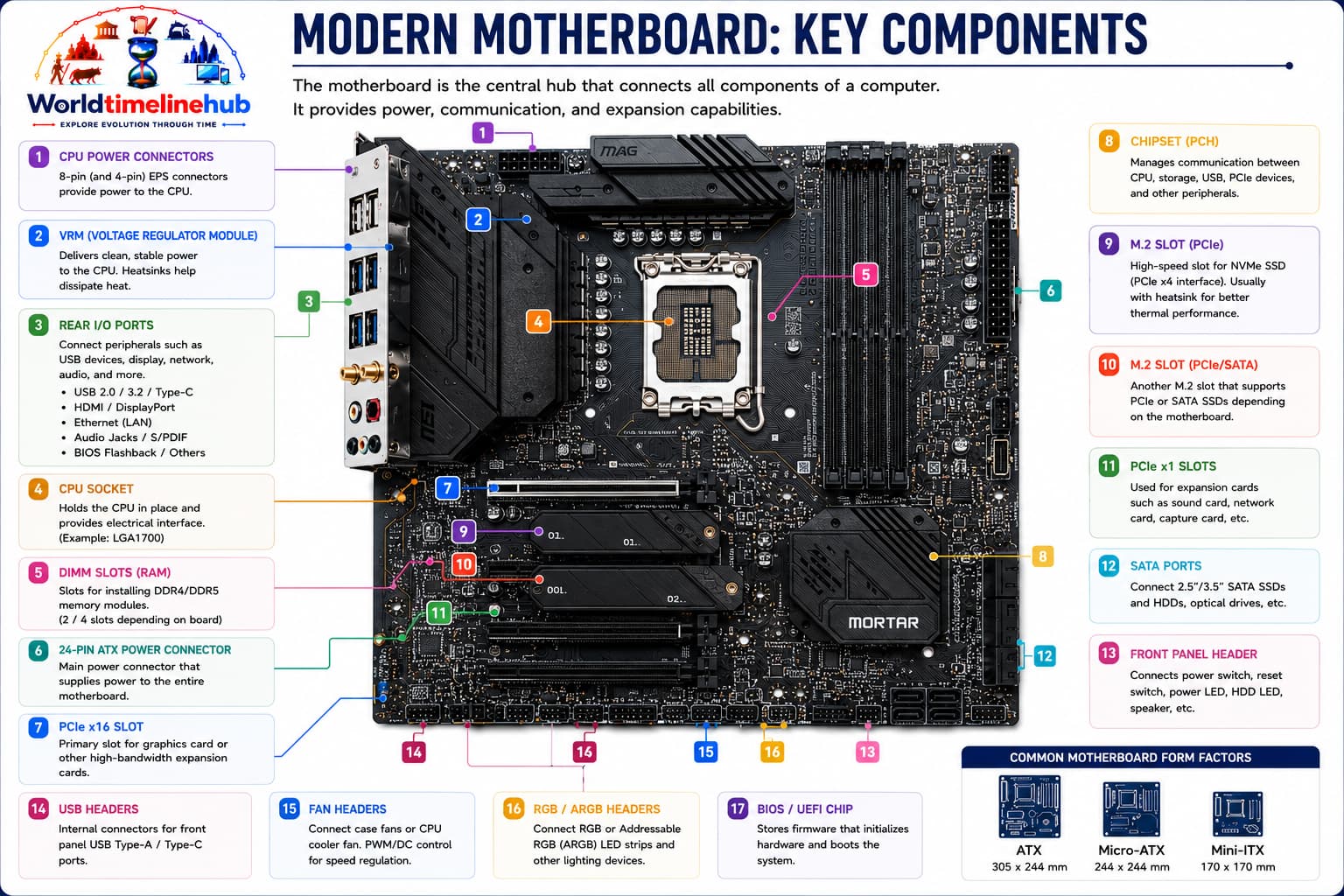
Main Parts on a Modern Motherboard
A modern board integrates power delivery, connectivity, and firmware in one PCB—these are the parts builders and technicians look for first.
CPU socket: Holds the processor; pin layout varies by generation (LGA, AM5, etc.).
RAM slots (DIMMs): Install memory modules; dual- or quad-channel layouts.
VRM phases: Power delivery circuits feeding the CPU under load.
Chipset / PCH: Manages USB, SATA, PCIe lanes not in the CPU.
M.2 slots: NVMe SSDs connect directly over PCIe.
CMOS battery: Keeps BIOS/UEFI settings when power is off.
Future Motherboard Predictions
Speculative roadmap—not certainties, but directions the industry is exploring for memory, interconnects, AI silicon, and repairability.
2025–2027: CAMM2 memory modules replace traditional DIMMs (laptops first, then desktops)
2026–2028: PCIe 6.0 (64 GT/s) with PAM4 signaling for AI accelerators
2028–2030: Optical interconnects replace copper traces for high-speed links
2030s: NPU-integrated CPUs become default; motherboards advertise TOPS ratings
Unified Extensible Firmware Interface; modern BIOS replacement
PCIe lane
Point-to-point serial connection for peripherals
Form factor
Standardized board size and mounting hole positions
VRM phase
Power delivery circuit; more phases = smoother power
POST
Power-On Self Test; checks hardware before booting
ECC memory
Error-Correcting Code RAM; detects and fixes data corruption
Heatsink
Cools hot components (VRMs, chipset, SSDs)
India spotlight
Motherboards in India’s PC market
India’s PC growth relied on imported and locally assembled boards from ASUS, Gigabyte, MSI, and Intel
reference designs — powering cybercafés, offices, gaming builds, and today’s compact creator workstations.
1990s
Clone PC shops
Local assemblers pair imported ATX boards with CPUs for office and home PCs.
2000s
Cybercafé boom
Budget microATX boards and onboard graphics fuel multiplayer gaming cafés.
2010s
Gaming & e-commerce
Online retailers sell enthusiast boards with RGB and overclocking features nationwide.
2020s
Builders & creators
DDR5, PCIe 5, and AI-ready platforms target streamers, developers, and design studios.
Test Your Knowledge
20 quick questions from the motherboard timeline. Click each question to reveal the answer.
Answer: CPU, RAM, storage, power, and expansion devices into one system.
Answer: MITS Altair 8800.
Answer: ISA (Industry Standard Architecture).
Answer: 1995.
Answer: Peripheral Component Interconnect.
Answer: PCI Express (PCIe).
Answer: A graphics card (GPU).
Answer: UEFI.
Answer: M.2 slot (over PCIe).
Answer: mini-ITX.
Answer: VRM (voltage regulator module) phases.
Answer: CMOS battery (coin cell).
Answer: Dedicated graphics cards (before PCIe).
Answer: DDR5.
Answer: A board with slots that only route signals — logic lives on plug-in cards.
Answer: HDDs, SSDs (SATA), or optical drives.
Answer: UEFI.
Answer: They need more power delivery, routing, and often larger or more complex VRM cooling.
Answer: Cybercafé PC assemblies (or clone PC shops).
Answer: More integration, faster serial buses, standardized form factors, and smarter firmware.
Classroom activity
Students Tasks
Use these 10 prompts for discussion, projects, or classroom presentations.
Jump to any other technology timeline on WorldTimelineHub.
Disclaimer: This content is AI-generated for educational purposes and may contain errors or outdated details. For correct and authoritative information, please refer to official and reliable sources such as government publications, manufacturers, museums, and academic references.