From batch monitors and UNIX timesharing to Windows, Linux, macOS, mobile kernels, and container orchestration, operating systems manage every program and device.
1950s -> PresentBatch -> GUICloud native
Operating System Origins
Early computers used raw machine code until monitors and executives scheduled batch jobs. UNIX unified ideas of files, processes, and pipes; personal computers brought GUI shells to millions.
The sections below trace that journey from batch mainframes through timesharing, desktop OS wars, mobile kernels, and today’s containerized cloud platforms.
Big picture
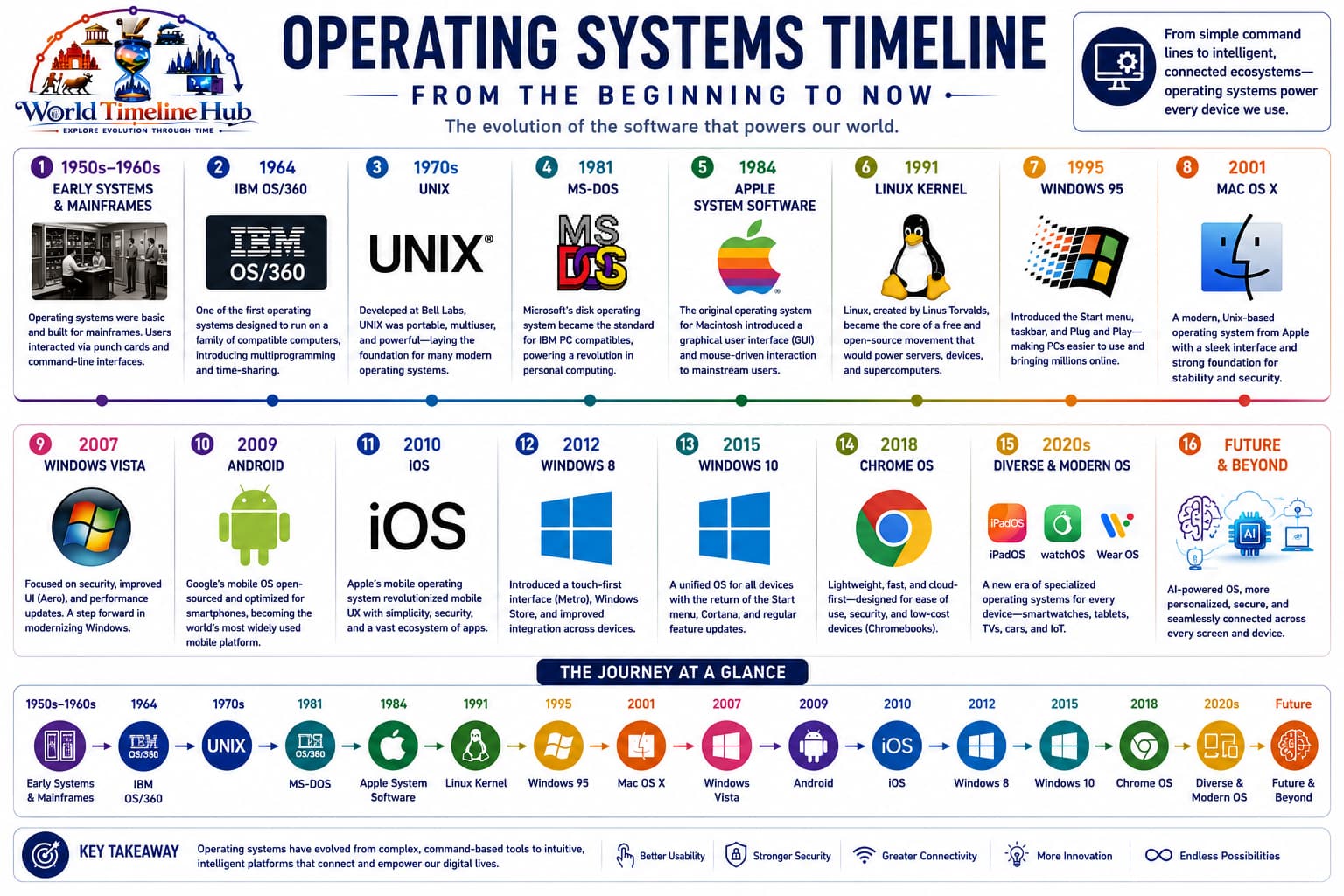
Operating system evolution in one view
OS layers evolved from simple loaders to kernels with virtual memory, security, networking stacks, and containers sharing one machine safely.
Operating system evolution: from batch monitors and timesharing to modern desktop, mobile, and containerized platforms.
Batch Jobs1950s - 1960s
Batch Processing and Early Monitors
Before interactive terminals, computers ran one queued job at a time while operators prepared the next deck of cards or tape—early “operating systems” were really simple monitors that loaded and started each program.
Programs submitted on cards or tape.
Monitors sequence jobs without manual reload.
FORTRAN and COBOL drive scientific and business batch.
Technology Used
Punched media: Job decks.
Resident monitor: Stays in memory.
Assembly loaders: Place programs in RAM.
Features
No interaction: Hours later results.
Expensive machines: Few sites.
Specialist operators: Machine room staff.
UNIX Era1960s - 1980s
Timesharing and the UNIX Family
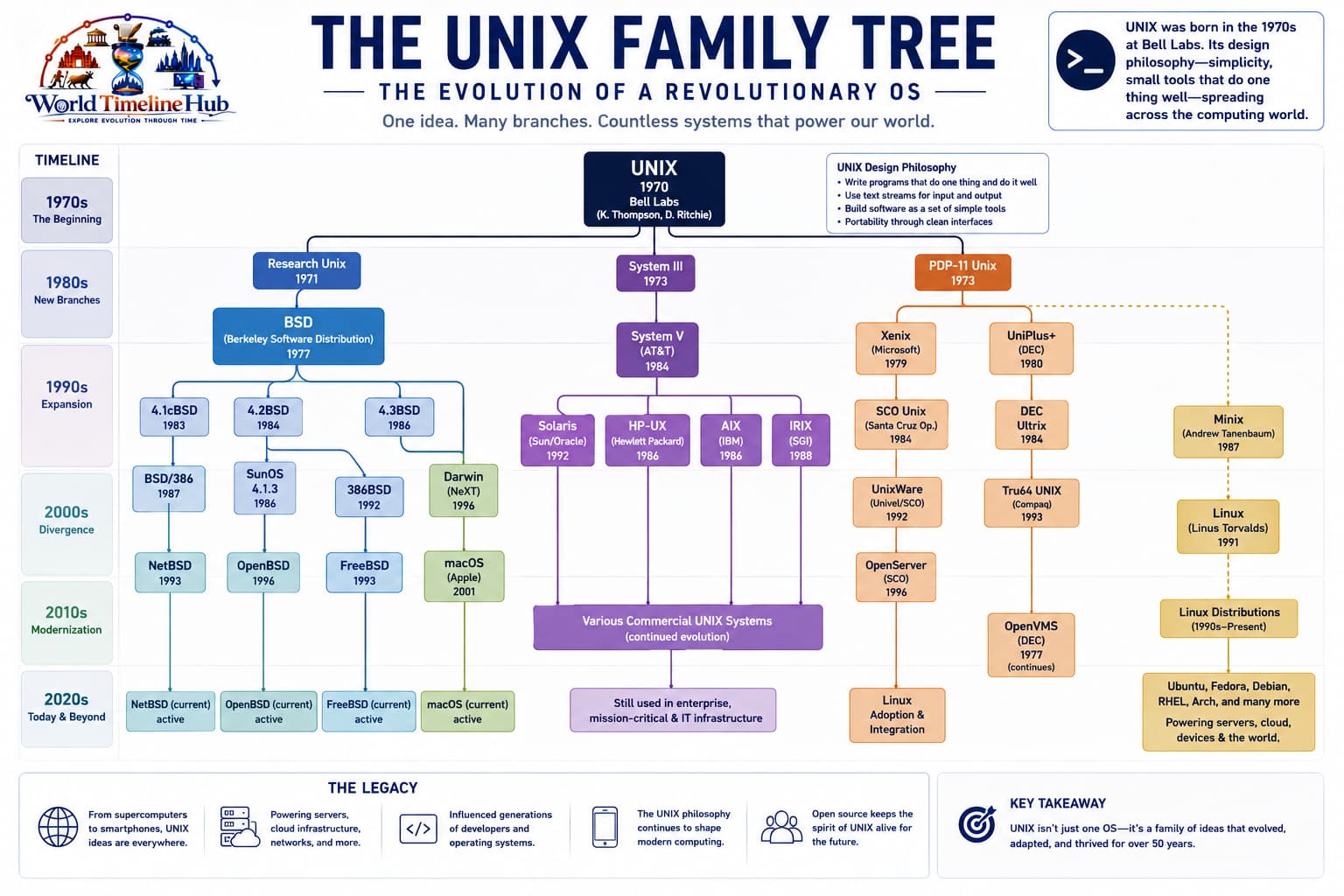
Timesharing let many users type at terminals on one machine, and UNIX turned files, processes, and pipes into a portable, modular design that still influences Linux, macOS, and Android today.
The UNIX family tree: how one research OS split into BSD, System V, Linux, and modern macOS lineages.
1969: UNIX developed at Bell Labs.
Timesharing lets many users share one CPU.
C language and portable kernels spread UNIX ideas.
Technology Used
Virtual memory: Isolated address spaces.
Shell: Command interpreter.
Kernel + utilities: Layered design.
Features
Multi-user: Simultaneous sessions.
Networking later: TCP/IP stacks added.
Portability: C UNIX across hardware.
Desktop GUI1980s - 1990s
Personal Computer GUI Operating Systems
Cheap PCs needed software that managed disks, printers, and mice while showing folders and windows anyone could learn—MS-DOS, Windows, Mac OS, and OS/2 competed to define the desktop.
MS-DOS boots IBM PC class machines.
1985: Windows adds GUI on DOS.
Mac OS and OS/2 experiment with desktop metaphors.
Technology Used
BIOS boot: Firmware handoff.
FAT file systems: Floppy and HDD.
GUI toolkits: Icons and event loops.
Features
Mass market: Home and school PCs.
Software ecosystem: ISVs ship apps.
Driver model: Peripheral support battles.
32/64-bit1990s - 2005
Windows NT Line, Mac OS X, and Linux Rise
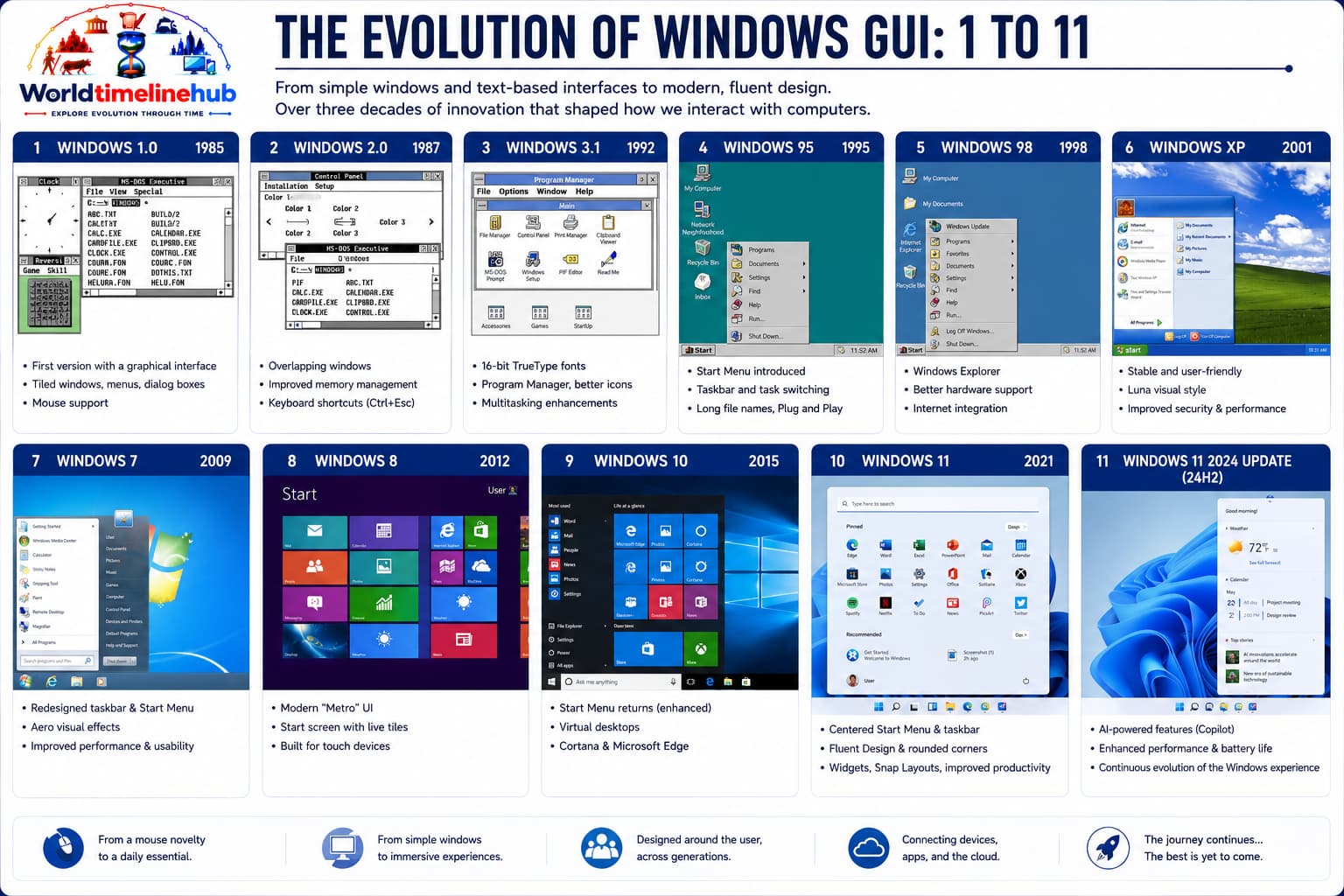
Modern kernels added protected memory, preemptive multitasking, and plug-and-play hardware. Windows NT stabilized the PC, macOS merged BSD with a polished GUI, and Linux became the default for servers and developers worldwide.
Windows evolution: from DOS-era shells to the NT kernel line that powers today’s desktops and servers.
Windows NT kernel unifies consumer and server.
2001: Mac OS X merges BSD and NeXT.
Linux distributions power servers and developers.
Technology Used
Protected memory: Process isolation.
ACPI: Power management.
Package managers: Linux software installs.
Features
Internet built-in: TCP/IP default.
Multimedia: Codecs and DirectX/OpenGL.
Open source: GPL Linux growth.
Mobile2006 - 2018
Mobile and Embedded Operating Systems
Smartphones demanded kernels tuned for touch, sensors, deep sleep, and strict app sandboxes. App stores centralized updates while Linux also powered countless IoT and embedded devices.
iOS and Android launch smartphone era.
RTOS and Linux power IoT devices.
App stores gate user software.
Technology Used
ARM SoCs: Mobile processors.
Sandbox: App permissions.
Power states: Deep sleep.
Features
Touch UI: Gesture-first.
Always on: Notifications.
Security updates: OTA patches.
Cloud Native2019 - Present
Containers, Kubernetes, and Edge OS
Cloud data centers run millions of Linux hosts. Containers and Kubernetes treat the OS as infrastructure you automate—spinning ephemeral workloads with patching, observability, and security built into the pipeline.
Containers package apps with dependencies.
Kubernetes orchestrates clusters.
Immutable infrastructure and micro-VMs improve security.
Technology Used
cgroups/namespaces: Linux isolation.
Kubernetes: Scheduling and service mesh.
eBPF: Kernel observability.
Features
DevOps: CI/CD everywhere.
Edge nodes: Lightweight OS at CDN.
Confidential computing: Encrypted VMs.
Operating System Timeline Summary
OS evolution from batch monitors to cloud-native platforms—use this table as a quick map before the detailed events, Windows/macOS/Linux timelines, and comparisons below.
Year / Era
Milestone
1950s
Batch monitors
1969
UNIX
1985
Windows GUI growth
2001
Mac OS X
2000s
Linux servers
2010s
Mobile OS
2020s
Kubernetes era
Key Operating System Historical Events
Beyond the main era cards, these milestones shaped how computers schedule work, present graphical desktops, and power phones and cloud servers today.
Event
Year
Why it matters
GM-NAA I/O (first OS)
1956
First batch operating system for IBM 704
CTSS (Compatible Time-Sharing System)
1961
Pioneered timesharing at MIT
UNIX created
1969
Bell Labs; influenced nearly all modern OSes
CP/M (Digital Research)
1974
First microcomputer OS for Intel 8080
MS-DOS
1981
IBM PC’s OS; Microsoft’s foundation
Macintosh System Software
1984
First successful consumer GUI OS
Windows 95
1995
Integrated GUI, Plug and Play, Start menu
Linux kernel 1.0
1994
Open source kernel for servers and desktops
Mac OS X
2001
BSD + NeXTSTEP; modern macOS foundation
Android (first release)
2008
Linux-based mobile OS from Google
iOS (iPhone OS)
2007
Apple’s mobile OS; popularized touch apps
Windows 10
2015
Unified OS across PCs, tablets, phones
Operating System “Firsts” at a Glance
Landmark “first” achievements in batch processing, timesharing, microcomputers, GUIs, open source, and mobile touch platforms.
First
Year
Achievement
First batch OS
1956
GM-NAA I/O
First timesharing OS
1961
CTSS
First UNIX version
1969
AT&T Bell Labs
First microcomputer OS
1974
CP/M
First GUI OS (commercial)
1983
Apple Lisa
First open source OS kernel
1991
Linux (Torvalds)
First mobile OS (modern touch)
2007
iOS (iPhone)
Microsoft Windows Timeline
Windows grew from a DOS shell into the NT kernel line that still powers desktops, laptops, and servers worldwide.
Version
Year
Key Feature
Windows 1.0
1985
First GUI for DOS
Windows 3.0
1990
Improved GUI, virtual memory, sold millions
Windows 95
1995
Start menu, taskbar, Plug and Play
Windows 98
1998
USB support, Internet Explorer integrated
Windows XP
2001
NT kernel for consumers, stable and popular
Windows Vista
2006
Aero GUI, UAC security (mixed reception)
Windows 7
2009
Refined Vista, widely loved
Windows 8
2012
Modern UI (Metro), removed Start menu
Windows 10
2015
Unified platform, Start menu returns
Windows 11
2021
Centered taskbar, Android apps, redesigned UI
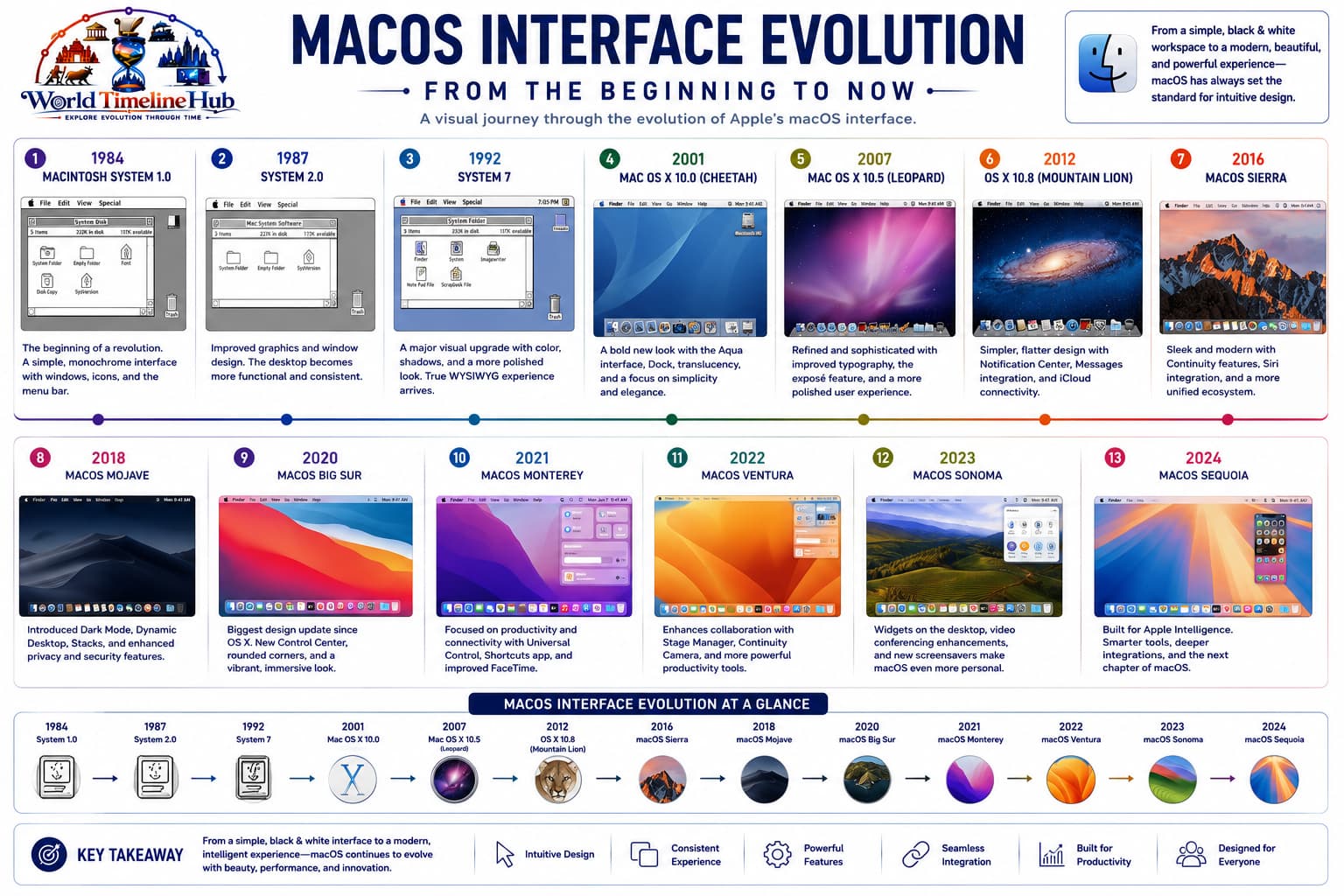
Apple macOS Timeline
Apple moved from classic Mac OS to Unix-based macOS, then annual releases with Metal graphics, Apple Silicon, and tighter integration with iPhone and iPad.
macOS evolution: from the original Macintosh GUI to Darwin-based macOS on Apple Silicon.
Version
Year
Key Feature
Mac OS System 1
1984
First Macintosh GUI
System 7
1991
Color QuickDraw, virtual memory
Mac OS 8/9
1997–1999
Classic Mac OS final versions
Mac OS X 10.0 (Cheetah)
2001
UNIX-based (Darwin), Aqua UI
Mac OS X 10.4 (Tiger)
2005
Spotlight search, Dashboard
OS X 10.9 (Mavericks)
2013
Free upgrade, iBooks, Maps
OS X 10.11 (El Capitan)
2015
Performance, Metal graphics API
macOS 10.15 (Catalina)
2019
No more 32-bit apps, Sidecar
macOS 11 (Big Sur)
2020
Apple Silicon M1 support, redesigned UI
macOS 14 (Sonoma)
2023
Widgets on desktop, Game Mode
Major Linux Distributions Timeline
Linux is one kernel with many distributions—each packages software, updates, and support for desktops, servers, or embedded targets.
Distribution
Year
Based On
Best For
Slackware
1993
Independent
Oldest still-maintained distro
Debian
1993
Independent
Stable, foundation for Ubuntu
Red Hat Linux
1994
Independent
Enterprise servers
SUSE Linux
1994
Independent
European enterprise
Ubuntu
2004
Debian
Beginner-friendly desktop
Fedora
2003
Red Hat
Cutting-edge, upstream RHEL
CentOS
2004
RHEL
Free enterprise-grade (stable line ended)
Arch Linux
2002
Independent
Rolling release, DIY enthusiasts
Linux Mint
2006
Ubuntu
User-friendly, media codecs included
Pop!_OS
2017
Ubuntu
System76 gaming/creator distro
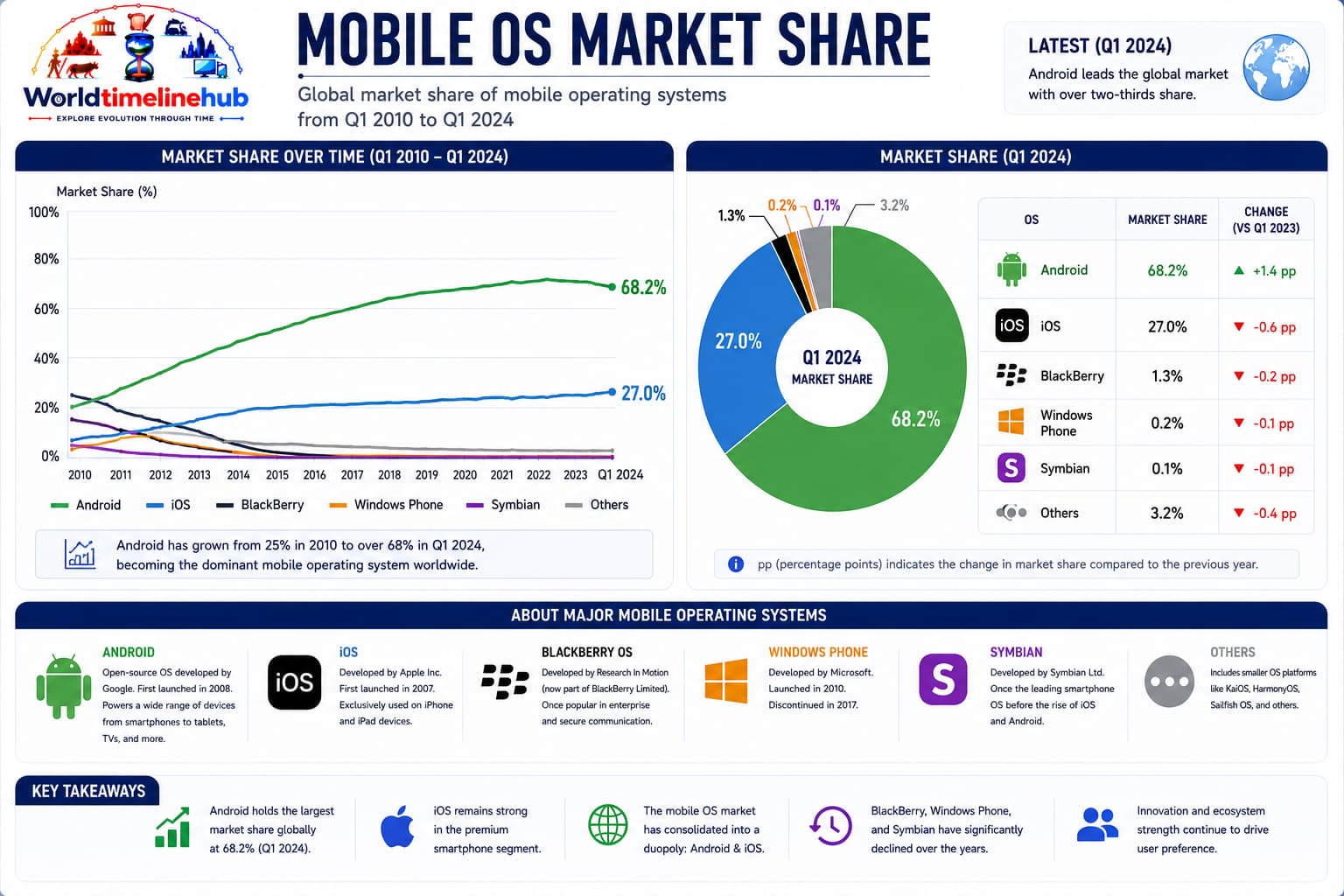
Mobile Operating Systems Timeline
Mobile OS history includes PDAs and keyboards, then touch-first iOS and Android dominating smartphones while older platforms were retired.
Mobile OS market: how iOS and Android displaced Palm, Symbian, BlackBerry, and Windows Phone.
OS
Year
Key Feature
Status
Palm OS
1996
PDA touch interface
Discontinued (2010)
Symbian
1998
Nokia’s smartphone OS
Discontinued (2014)
Windows Mobile
2000
Stylus-based PDA OS
Replaced by Windows Phone
BlackBerry OS
2002
Physical keyboard, BBM
Discontinued (2018)
iOS (iPhone OS)
2007
First modern touch mobile OS
Active
Android
2008
Linux-based, open source
Active
Windows Phone
2010
Metro UI, Live Tiles
Discontinued (2019)
Tizen
2012
Samsung’s Linux-based OS
Smart TVs, watches
HarmonyOS
2020
Huawei’s distributed OS
Active (China)
Kernel Architecture Comparison
Kernel design trades speed, stability, and security. Most consumer OSes use monolithic or hybrid kernels rather than pure microkernels.
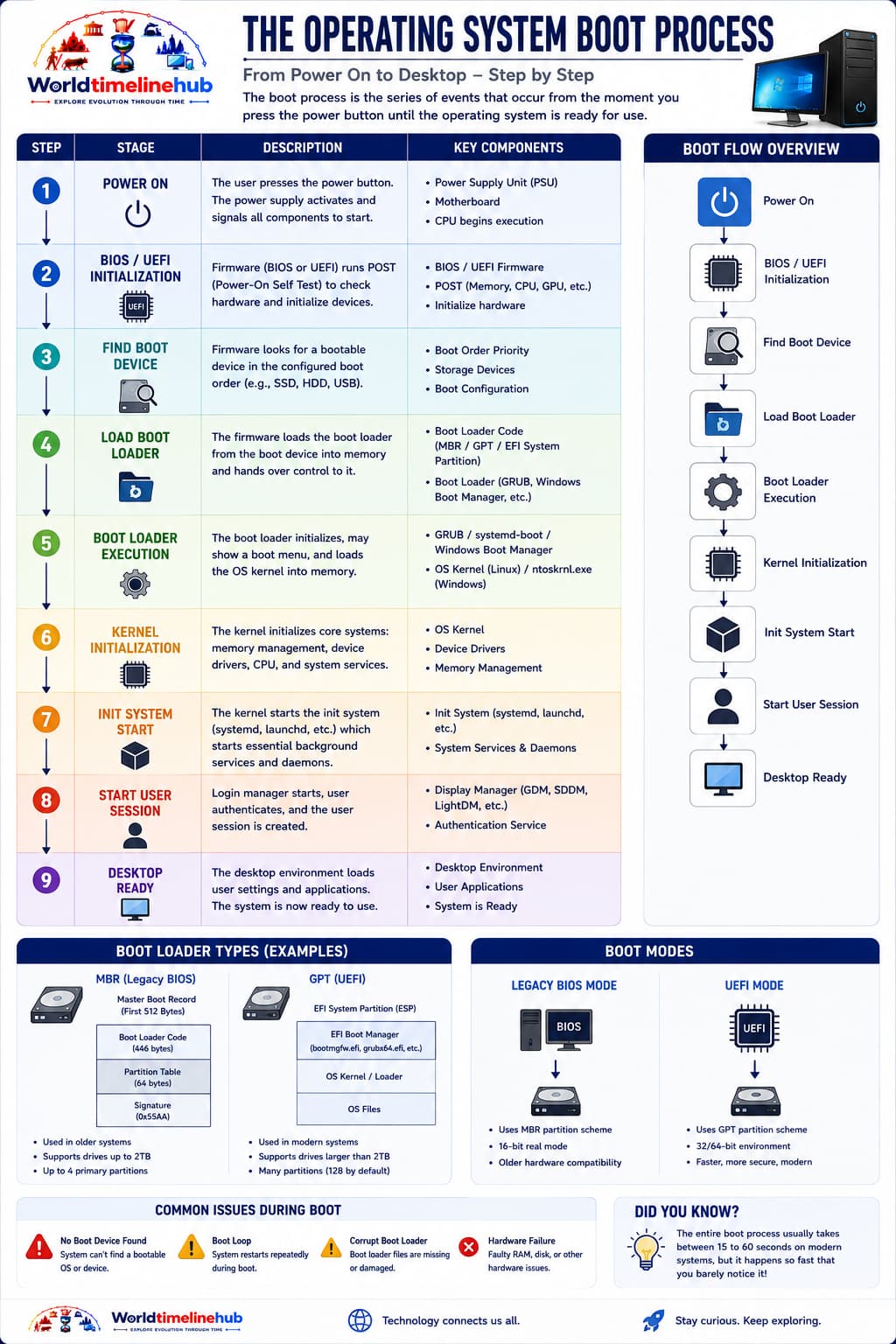
Boot process: firmware hands off to a bootloader, which loads the kernel and starts core services.
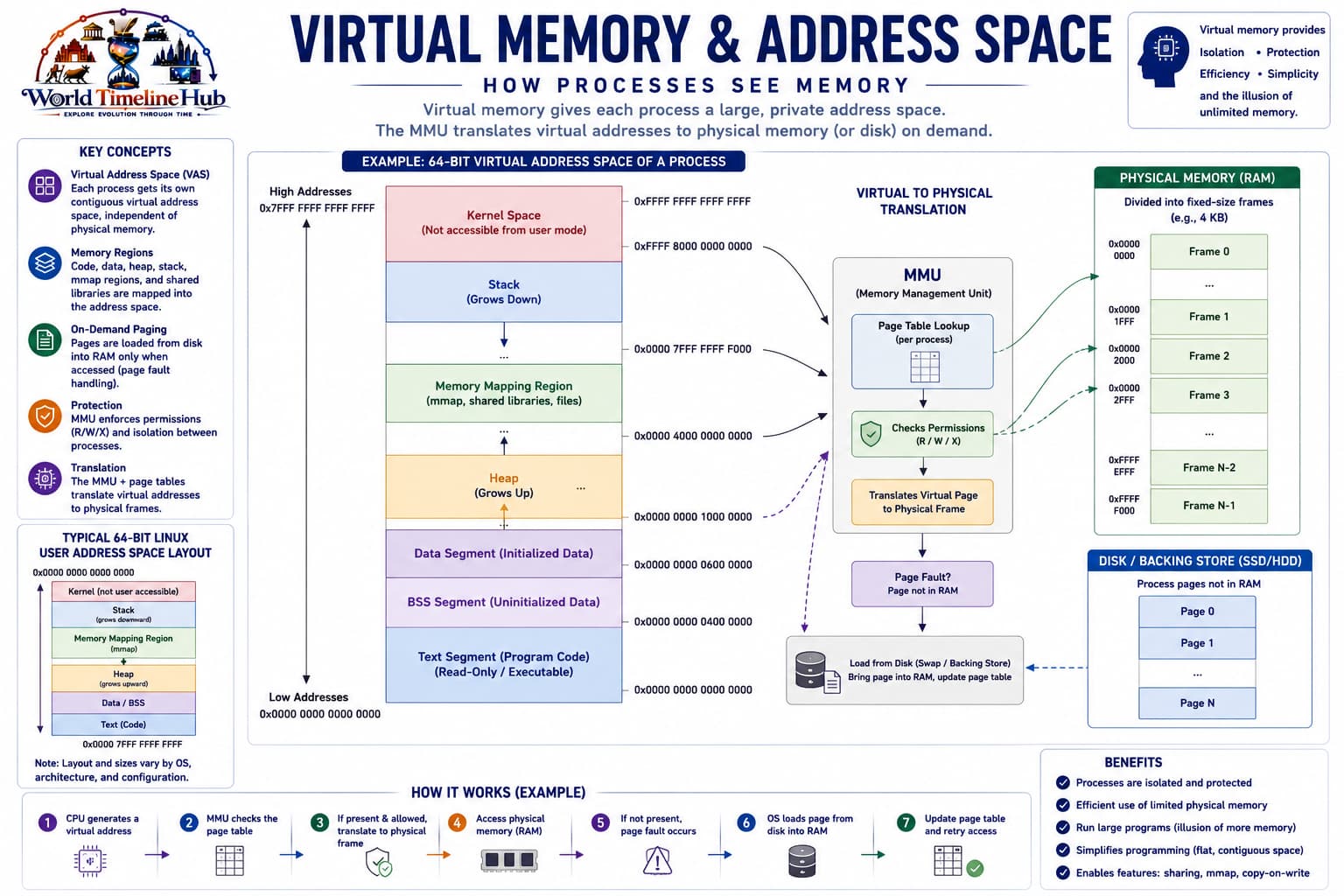
Virtual memory: how the kernel gives each process isolated address spaces while sharing physical RAM.
Kernel Type
Description
Examples
Pros
Cons
Monolithic
All OS services in kernel
Linux, Unix, Windows
Fast, efficient
Large, harder to debug
Microkernel
Minimal kernel + user-space servers
QNX, L4, Mach
Stable, modular, secure
Slower (IPC overhead)
Hybrid
Monolithic + some microkernel ideas
Windows NT, XNU (macOS)
Balance of speed and stability
Complex design
Exokernel
Minimal hardware abstraction
MIT Exokernel
Maximum performance
Application must manage resources
Operating System Pioneers
Researchers, entrepreneurs, and companies whose operating systems and ideas still shape desktops, servers, and phones.
Person / Company
Contribution
Ken Thompson & Dennis Ritchie
UNIX at Bell Labs
Linus Torvalds
Linux kernel (1991)
Bill Gates & Paul Allen
MS-DOS, Windows, Microsoft
Steve Jobs & Steve Wozniak
Macintosh GUI OS, iOS, macOS
Andy Rubin
Android (co-founder)
Gary Kildall
CP/M (first microcomputer OS)
John McCarthy
Lisp (influenced OS design)
Andrew S. Tanenbaum
MINIX (educational OS)
Then vs Now: Operating System Experience
Compare a typical 1980s–90s PC experience with a modern desktop or laptop—same role as the computer’s manager, but vastly different memory, security, and updates.
Metric
Then (1980s–90s)
Now (2020s)
Typical OS
MS-DOS, Windows 3.1/95
Windows 11, macOS Sonoma, Linux
Interface
Command line + basic GUI
Touch/mouse/voice/AI assistants
Memory needed
640 KB to 4 MB
4 GB minimum, 16 GB recommended
Installation method
Floppy disks (10+ disks)
USB drive, internet download
Software sources
Floppy/CD-ROMs, BBS
App stores, package managers
Security model
Single-user, no permissions
User accounts, UAC, sandboxing
Updates
None or occasional CD
Monthly security patches, feature updates
Multitasking
Cooperative (one app could freeze system)
Preemptive (stable, many apps)
Future Operating System Predictions
Speculative roadmap—not certainties, but directions for AI integration, cloud-native kernels, memory-safe code, and cross-device experiences.
2025–2027: AI-powered OS assistants deeply integrated (Copilot, Gemini)
2026–2028: Unikernels for lightweight cloud and edge computing
2028–2030: Memory-safe kernels (Rust-written) become mainstream
2030s: Federated OS across devices (phone, PC, car, home) seamlessly
2035+: Neural interfaces as primary input for some assistive OSes
Major OS Families
Today’s computing landscape is dominated by a few families that share kernels, APIs, and software ecosystems—even when the user interface looks completely different.
Family
Examples
UNIX-like
Linux, macOS, BSD
Microsoft
Windows
Mobile
Android, iOS
Embedded
FreeRTOS, Zephyr
Core OS Services
Every operating system hides hardware complexity behind a kernel that schedules work, manages memory, stores files, and loads drivers so applications can focus on user tasks.
Process scheduling: CPU sharing.
Memory management: Virtual RAM.
File systems: Persistent storage.
Device drivers: Hardware abstraction.
India spotlight
Operating systems in India
Academic UNIX labs, PC DOS/Windows adoption, Linux in servers, and Android on phones shaped India's computing experience.
1980s
UNIX academic labs
IITs and universities ran UNIX minicomputers.
1990s
Windows PC wave
DOS/Windows dominated offices and cyber cafes.
2000s
Linux in data centers
ISPs and IT firms standardized on Linux servers.
2010s
Android majority
Mobile Linux (Android) became default phones.
2020s
Cloud Kubernetes
Indian SaaS adopted container platforms.
Test Your Knowledge
20 quick questions from the operating system timeline. Click each question to reveal the answer and check what you remember from the eras, tables, and India spotlight above.
Answer: Batch processing.
Answer: Bell Labs (1969).
Answer: C.
Answer: Mac OS (System).
Answer: NT kernel.
Answer: GPL.
Answer: Scheduler.
Answer: Process isolation / larger address space.
Answer: Kubernetes.
Answer: Linux.
Answer: Darwin/XNU.
Answer: Sandbox policies.
Answer: cgroups and namespaces.
Answer: FAT.
Answer: User commands.
Answer: Hardware devices.
Answer: Real-Time Operating System.
Answer: Android.
Answer: Kernel observability.
Answer: Cloud-native, automated, and security-focused platforms.
Classroom activity
Students Tasks
Use these 10 prompts for discussion, projects, or classroom presentations.
KernelsUNIXPC historyCloud
Define operating system in your own words.
Compare batch vs timesharing.
Draw layers: app, kernel, hardware.
Why did UNIX influence Linux and macOS?
Explain virtual memory simply.
What is a device driver?
Compare monolithic vs microkernel (overview).
How do containers differ from VMs?
Research Linux use in Indian servers.
Predict edge OS trends.
Continue exploring
Browse related technology timelines and compare how input devices, software, and networks evolved together.
Jump to any other technology timeline on WorldTimelineHub.
Disclaimer: This content is AI-generated for educational purposes and may contain errors or outdated details. For correct and authoritative information, please refer to official and reliable sources such as government publications, manufacturers, museums, and academic references.