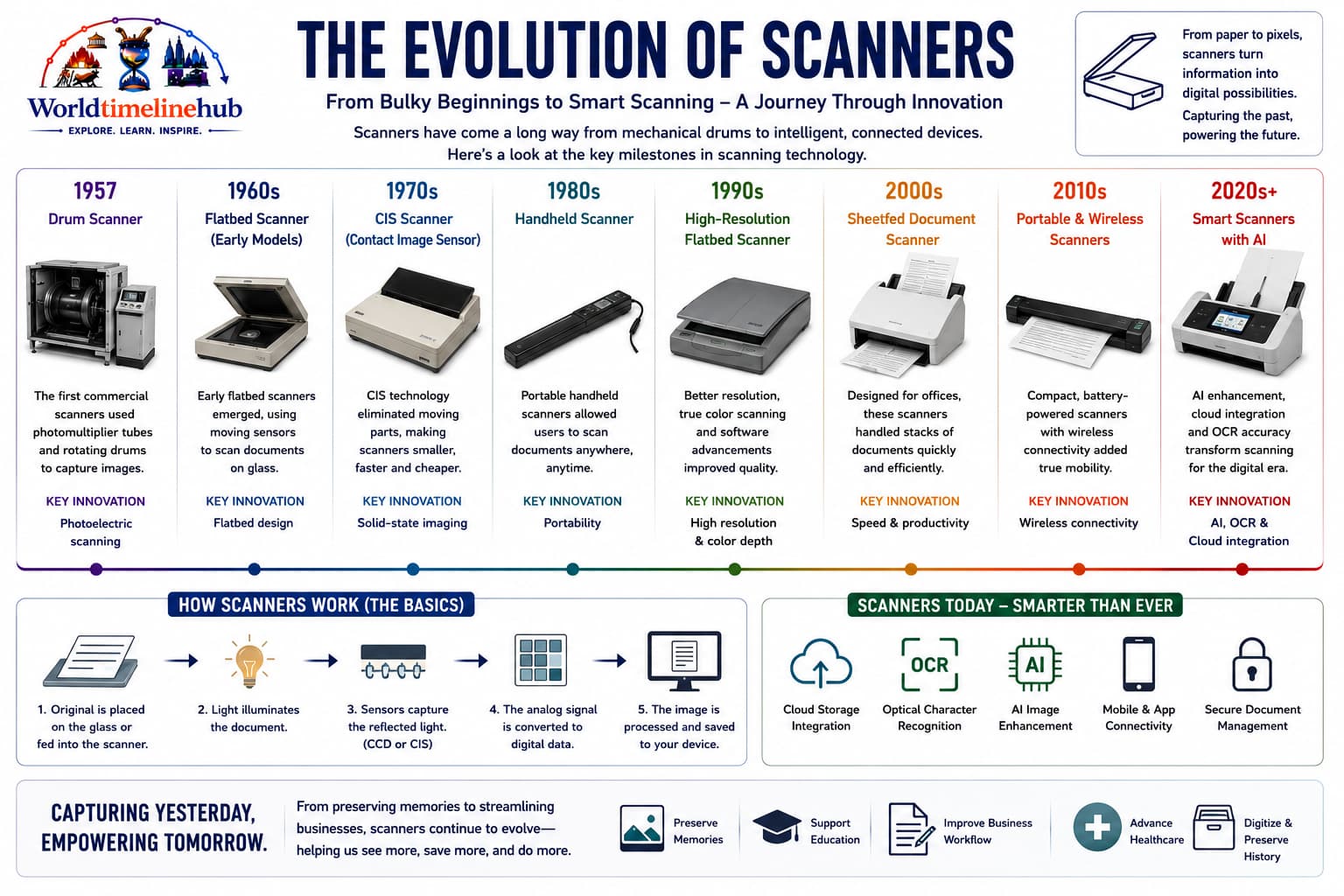
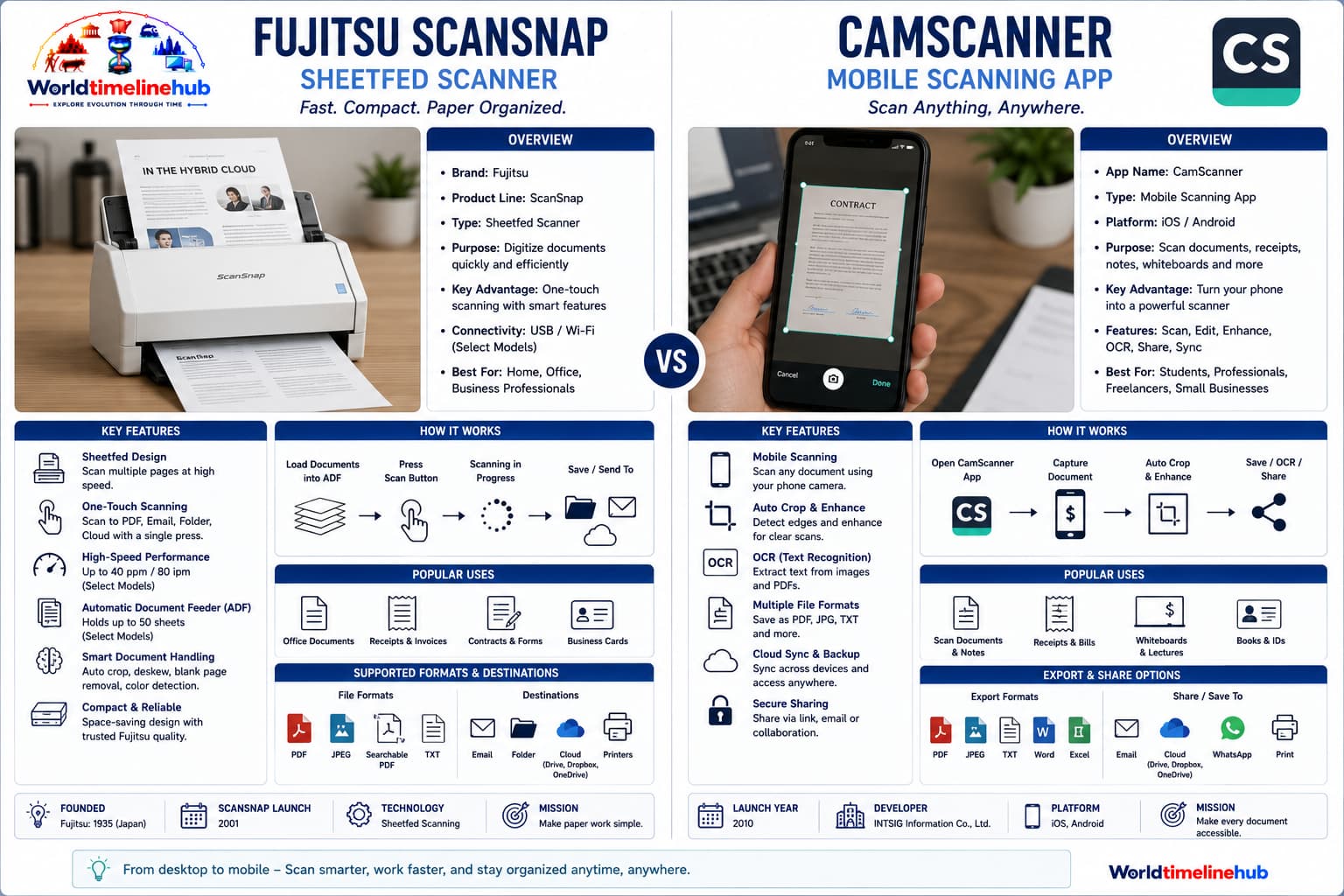
From fax drums and flatbed CCD scanners to portable document cameras and smartphone OCR, scanners turned paper into editable data.
This timeline traces how image capture moved from telegraph fax to publishing drums, office flatbeds, high-speed feeders, and AI workflows that read invoices without a human retyping every line.
1860s -> PresentFax -> FlatbedOCR -> Cloud
Scanner Invention
Early facsimile and telegraph image experiments led to drum scanners for publishing, then flatbed CCD scanners for offices, and now camera-based OCR on phones. Giovanni Caselli’s 1865 fax concepts, photomultiplier drum scanners, and modern edge OCR each solved the same problem: turning physical marks into bits you can search, copy, and route in software.
The era cards and reference tables below cover fax origins through AI document capture, plus how India scaled bank and government digitization.
Big picture
Scanner evolution in one view
Scanning moved from analog fax transmission to high-resolution color digitization, searchable PDFs, and cloud document workflows. The stats below anchor that arc to early fax, flatbed CCD, mainstream OCR, and phone-based capture today.
Scanner evolution: from telegraph fax and publishing drums to office flatbeds, high-speed feeders, and phone-based capture.
Wire Images1860s - 1950s
Facsimile and Early Image Transmission
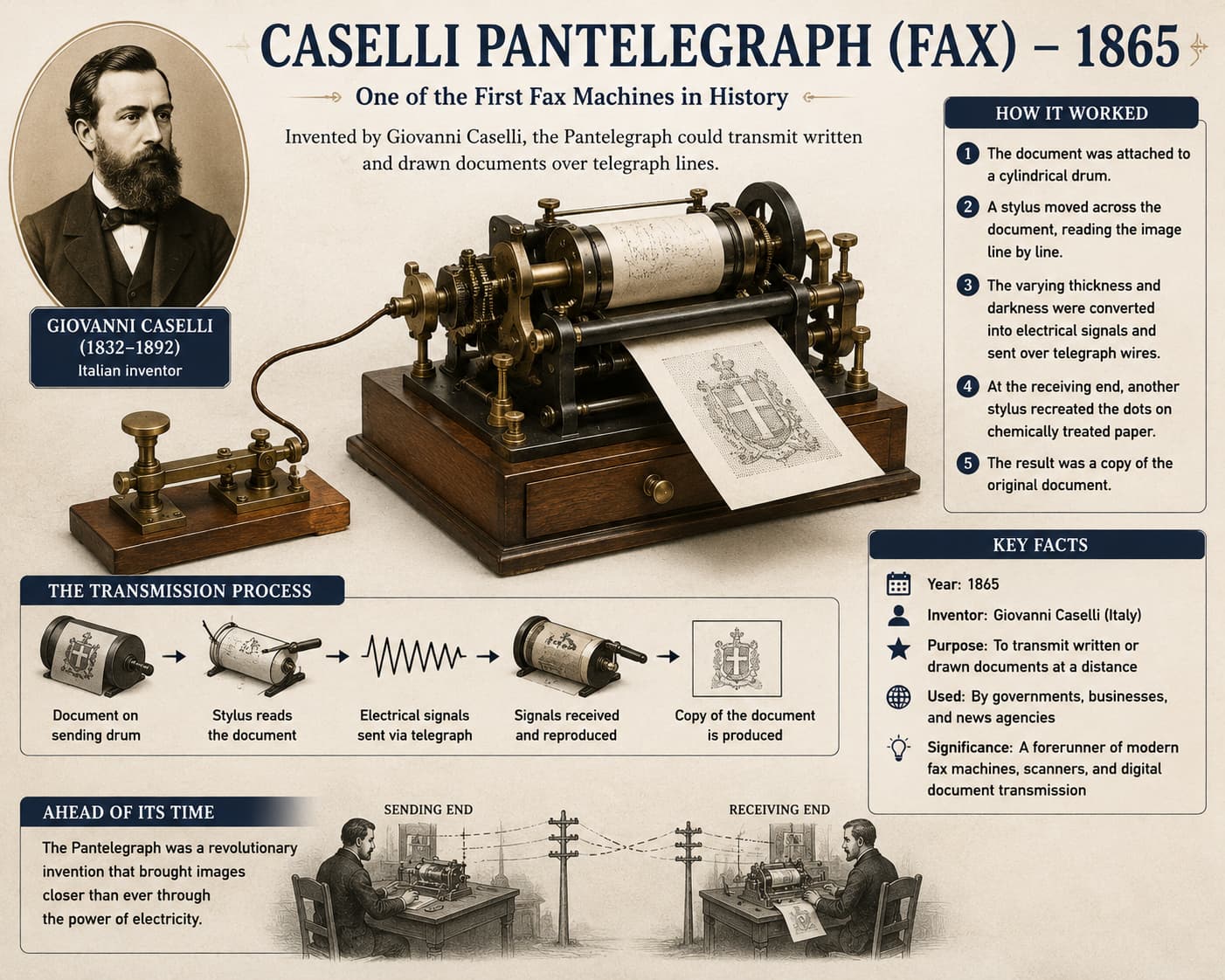
Long before flatbed desktops, synchronized drums and photochemical processes sent line-by-line images across telegraph wires for news and weather charts—proving that documents could travel as fast as Morse code, if not faster than mail.
Facsimile origins: mechanical drums and telegraph timing sent line-by-line images before digital flatbeds existed.
1865: Caselli fax concepts.
Telegraph networks carry coded images.
Rotating drums scan documents mechanically.
Technology Used
Rotating drum: Mechanical scan path.
Photochemical paper: Early copy surfaces.
Telegraph timing: Synchronized clocks.
Features
Slow transmission: Minutes per page.
Specialized: Press and military.
Analog: No digital files yet.
Publishing1950s - 1980s
Drum Scanners for Publishing
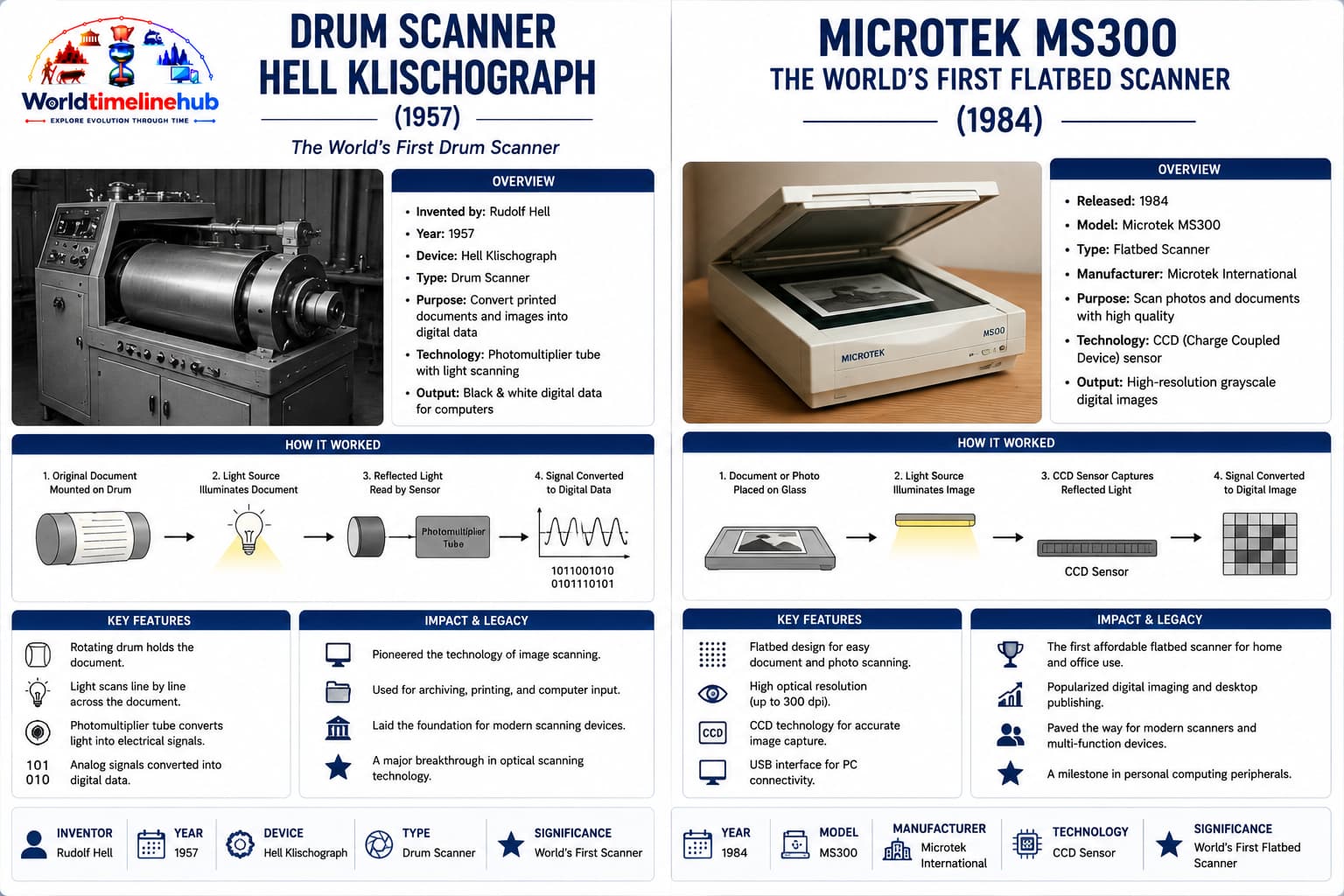
Drum scanners offered studio-grade color for magazines and catalogs, mounting originals on rotating cylinders read by precise photodetectors. They were slow and costly, but set the quality bar that flatbed CCD arrays would chase for decades.
Drum scanning era: rotating cylinders and photomultipliers delivered prepress color quality for print houses.
High-end color separation for print.
Photomultiplier tubes read reflected light.
Prepress houses digitize film and art.
Technology Used
Photomultiplier: Sensitive light sensing.
Color filters: RGB separation.
Large drums: High-resolution paths.
Features
Pro only: Very expensive.
Excellent color: Print industry standard.
Slow workflow: Operator skill required.
Desktop Scan1980s - 1990s
Flatbed CCD Office Scanners
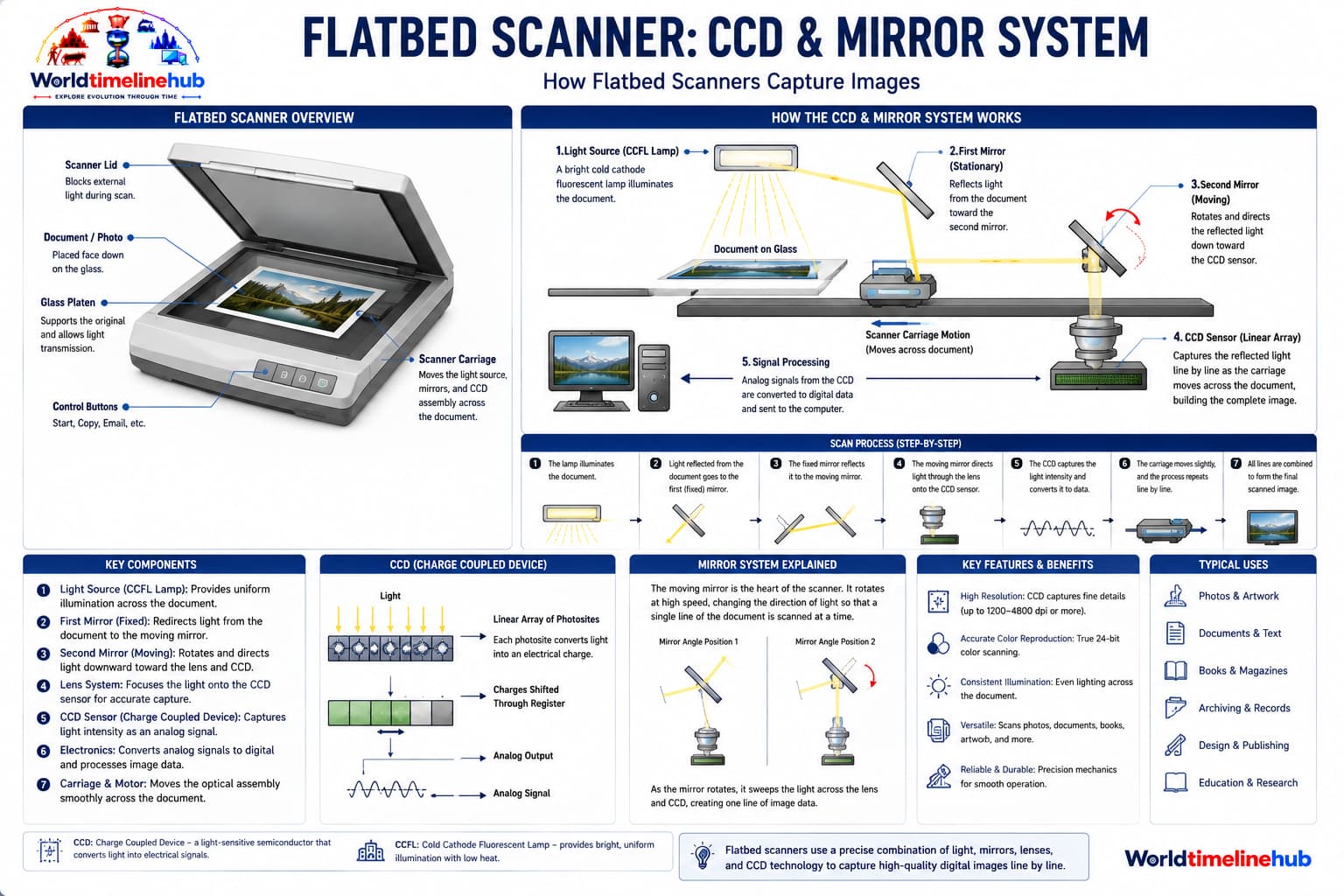
Glass-plate flatbeds let offices digitize contracts and photos at desk size, pairing SCSI then USB interfaces with emerging OCR software. Paperless filing cabinets began here—scan once, email PDFs, and stop photocopying stacks by hand.
Flatbed CCD era: glass-plate scanners brought desk-sized digitization and TWAIN drivers to everyday offices.
CCD sensor arrays replace many drum workflows.
TWAIN drivers connect scanners to PCs.
Sheet-fed ADF addons scan stacks.
Technology Used
CCD arrays: Line sensors across page width.
TWAIN/WIA: Driver standards.
ADF feeders: Multi-page input.
Features
Affordable offices: Paperless beginnings.
300-600 DPI: Good text clarity.
Bit depth growth: Gray and color.
Workgroup2000 - 2012
Sheet-fed and Workgroup Scanners
Workgroups routed paper mail directly to PDF repositories, with ultrasonic double-feed detection and staple detection improving reliability. Speed (pages per minute) and searchable PDF output became the metrics that mattered for compliance and records teams.
Dedicated sheet-fed models for mailrooms.
Network scanners upload to shared folders.
PDF becomes default output format.
Technology Used
Sheet-fed path: Rapid page feeding.
Ethernet: Network scan to NAS.
PDF compression: JBIG2 and MRC.
Features
High PPM: Pages per minute race.
Searchable PDF: OCR bundled.
Compliance: Records retention.
Pocket Scan2013 - 2020
Mobile Cameras and Cloud OCR
CMOS phone cameras plus machine vision corrected perspective, while cloud services classified documents and extracted structured fields automatically. The scanner in your pocket replaced many travel wand devices—at the cost of uploading sensitive pages to third-party servers unless you chose offline apps.
Mobile OCR era: phone cameras, auto-crop, and cloud APIs turn receipts and forms into searchable PDFs anywhere.
Smartphone apps scan receipts and whiteboards.
Cloud APIs extract tables and forms.
Portable wand scanners for travelers.
Technology Used
CMOS sensors: Phone camera scanning.
Cloud OCR APIs: Text and table extraction.
Perspective correction: Vision algorithms.
Features
Always available: Scan anywhere.
Auto enhance: Contrast and crop.
Privacy concerns: Cloud upload policies.
AI Capture2021 - Present
AI Document Capture and Automation
Modern capture mixes hardware feeders with AI that classifies layouts, redacts sensitive fields, and routes documents into business workflows automatically. Scanning is less about pixels and more about understanding—invoices, IDs, and forms land in the right database field without manual data entry.
On-device OCR improves privacy.
RPA bots ingest scanned invoices.
3D and multispectral scanning for archives.
Technology Used
Edge OCR: On-device language models.
RPA integration: Workflow bots.
Multispectral: Archival preservation.
Features
Hands-free: Less manual tagging.
Compliance AI: PII detection.
Hybrid mail: Paper + digital parity.
Scanner Timeline Summary
Scanner and digitization milestones—each row ties an era to the dominant capture style and why it mattered for offices, publishing, and searchable archives. Use this table as a map before the key events, firsts, sensor and interface tables, OCR evolution, pioneers, and India spotlight sections below.
Year / Era
Milestone
Why it matters
1865
Fax concepts
Proved images could travel on telegraph networks—ancestor of every remote document copy.
1950s–80s
Drum scanners
Studio color for magazines set the quality standard before affordable flatbeds.
1970s
Flatbed CCD
Desk-sized digitization brought scanning into banks, law firms, and home offices.
1990s
OCR PDFs
Searchable text layers turned scans from pictures into data you could find and edit.
2000s
Network scanners
Sheet-fed workgroups piped mailrooms straight to shared PDF repositories.
2010s
Mobile OCR
Phone cameras plus cloud APIs made capture ambient—receipts, boards, forms anywhere.
2020s
AI capture
Layout understanding, PII redaction, and RPA ingestion automate what clerks used to type.
Key Scanner Historical Events
Beyond the main era cards, these milestones shaped how capture moved from fax drums to desktop flatbeds, TWAIN drivers, mobile apps, and privacy-focused edge OCR. Each row highlights a turning point that still influences how offices and phones digitize paper today.
Event
Year
Significance
Caselli’s Pantelegraph patent
1865
First practical fax machine—line-by-line image transmission over telegraph wires.
First commercial drum scanner
1950s
Publishing industry digitization begins—prepress color separation at studio quality.
Rudolf Hell’s Klischograph
1950s
Color scanning for printing plates—electronic engraving for newspapers and catalogs.
First flatbed CCD scanner
1970s
Desktop document scanning possible without mounting originals on a drum.
TWAIN standard established
1992
Scanners work with Windows apps through a common driver layer.
OCR becomes mainstream
1990s
Searchable PDFs enter offices—scans gain hidden text layers for search and copy-paste.
First USB scanner
1990s
No more SCSI cards needed—plug-and-play on consumer PCs.
First mobile scanning app (CamScanner)
2010
Phone cameras replace flatbeds for receipts and quick document capture.
Cloud OCR APIs (Google Vision, AWS)
2010s
AI-based text extraction for forms, tables, and multilingual documents.
Edge OCR on smartphones
2020s
Privacy-focused on-device processing without uploading every page to the cloud.
Scanner “Firsts” at a Glance
Landmark “first” achievements in fax, drum color, desktop flatbeds, sheet-fed ADF, USB, Wi-Fi, and mobile apps. When you scan from a phone or mailroom feeder, it often traces back to one of these pioneering products or standards.
First
Year
Achievement
First fax machine
1865
Giovanni Caselli’s Pantelegraph
First color drum scanner
1950s
Publishing industry standard for magazines and catalogs
Simplified connectivity without SCSI host adapters
First mobile scanning app
2010
CamScanner
First scanner with Wi-Fi
2000s
Network scanning to shared folders without a PC tether
First portable wand scanner
2000s
Pen-style roll scanners for travel and field work
CCD vs CIS: Scanner Sensor Technology
Flatbed and sheet-fed scanners use either CCD (charge-coupled device) arrays with optics or CIS (contact image sensor) strips that touch the page. CCD favors depth and color for photos and books; CIS favors thin, efficient office paths.
Feature
CCD (Charge-Coupled Device)
CIS (Contact Image Sensor)
Image quality
Excellent color, depth, sharpness
Good, but less depth variation
Depth of field
Greater (handles curved pages)
Shallow (needs flat originals)
Power consumption
Higher (needs warm-up, lamps)
Lower (LED lights)
Durability
Glass elements, can degrade over time
More durable, fewer moving parts
Thickness
Thicker (requires optics/lens)
Thinner (ideal for portable scanners)
Typical use
Professional photo, book scanning
Office documents, portable devices
Scanner Interface Evolution
How scanners plug into computers and networks changed setup time and throughput. SCSI and parallel ports gave way to USB; workgroups added Ethernet and Wi-Fi so mailrooms could drop PDFs on NAS shares without a tethered PC.
Interface
Era
Speed
Pros & cons
SCSI
1980s–1990s
5–40 MB/s
Fast but required adapter card, complex setup
Parallel (Centronics)
1980s–1990s
0.1–1 MB/s
Slow, cumbersome cabling
USB 1.1
1990s
12 Mbps
Plug and play, slower for high-res color
USB 2.0
2000s
480 Mbps
Fast enough for most office scanning
FireWire (IEEE 1394)
2000s
400–800 Mbps
Common on Macs, low CPU overhead
Ethernet
2000s+
100–1000 Mbps
Network scanning for workgroups and MFPs
Wi-Fi
2010s+
54–100+ Mbps
Wireless freedom, more setup complexity
USB 3.0/3.1
2010s+
5–10 Gbps
Very fast, modern standard for high-DPI feeds
Resolution Evolution (DPI)
Dots per inch (DPI) measures how many samples the scanner captures per inch of original. Text needs far less than film or art; marketing “optical vs interpolated” DPI still confuses buyers—optical resolution is what truly limits detail.
Era
Typical DPI
Scanner type
Use case
1970s–80s
200–300 DPI
Flatbed
Text documents and faxes
1990s
300–600 DPI
Flatbed, sheet-fed
Office documents, basic photos
2000s
600–1200 DPI
Photo scanners
High-quality prints and slides
2010s
1200–2400 DPI
Professional flatbed
Archival scans and film holders
Present
2400–4800+ DPI
High-end flatbed
Professional photo and art reproduction
OCR Technology Evolution
Optical character recognition turned scans from pictures into editable, searchable text. Accuracy climbed from template matching on clean print to neural networks that read handwriting, tables, and dozens of scripts—often in the cloud, now increasingly on-device.
Era
OCR technology
Accuracy
Capabilities
1980s–90s
Template matching
Poor
Only clean printed text in fixed fonts
1990s–2000s
Feature extraction
~90%
Multiple fonts, basic layout
2000s–2010s
Neural networks
~95–98%
Handwriting, complex layouts
2010s–2020s
Deep learning + cloud APIs
~99%
Tables, forms, non-English scripts
2020s–present
Edge OCR (on-device AI)
~99%
Fast, private, offline processing on phones and PCs
Scanner Pioneers
Inventors, engineers, and companies whose work on fax, drum color, flatbed hardware, sheet-fed ADF, OCR, and PDF standards made modern digitization possible. Hardware and software evolved together—without searchable PDFs, scans would still be opaque image files.
Person / company
Contribution
Giovanni Caselli
Invented Pantelegraph (1865), first practical fax machine
Rudolf Hell
Hellschreiber and Klischograph—color scanning for printing plates
Microtek
Early desktop flatbed scanner (MS-300, 1984)
Hewlett-Packard (HP)
Popularized flatbed scanners for offices and consumers
Fujitsu
ScanSnap series—made sheet-fed scanning accessible on desks
Epson
High-quality photo scanning, Perfection series
Ray Kurzweil
Omni-font OCR (Kurzweil) changed how machines read varied print
Adobe
PDF format standardization and searchable PDF workflows
Then vs Now: Scanning Experience
Compare a typical office setup of the 1990s with capture in the 2020s—same goal (paper to digital), vastly different speed, accuracy, interfaces, and where files land after the scan button.
Metric
Then (1990s)
Now (2020s)
Typical scanner
Flatbed SCSI scanner
Phone + sheet-fed MFP / network scanner
Resolution
300–600 DPI
2400+ DPI flatbed / 12 MP+ phone camera
Interface
SCSI (adapter card needed)
USB, Wi-Fi, cloud upload
Speed
30–60 seconds per page (flatbed)
1–2 seconds per page (sheet-fed)
OCR accuracy
~90% (clean text only)
~99% (including handwriting on good apps)
Storage
Local HDD (floppy backup)
Cloud, automatic sync, DMS repositories
Mobile scanning
Impossible
Phone camera + auto-crop and enhance
File output
TIFF, BMP
Searchable PDF, JPEG, shared drives
Future Scanner Predictions
Capture is shifting from “save a PDF” to “understand and route the document.” These trends blend computer vision, on-device models, and compliance tech—fewer standalone scanners on desks, but more intelligence at the moment of scan.
2025–2027: AI-powered document classification and auto-indexing at capture time—invoices and contracts land in the right folder without manual tagging.
2026–2028: Real-time translation of scanned foreign-language documents for global teams and citizen services.
2028–2030: 3D scanning integrated into standard smartphone cameras for parcels, heritage objects, and room capture.
2030s: Hyperspectral scanning for authenticity verification and anti-counterfeiting on certificates and currency.
2035+: Biometric document scanning with built-in liveness detection for high-assurance KYC and border control.
Scanner Types
Different scanner designs trade speed, color fidelity, and portability. Publishing still uses drum quality where needed; mailrooms want sheet-fed PPM; travelers and students often skip hardware entirely and use camera OCR apps.
Type
Best for
Typical strengths
Flatbed
Photos, bound pages, fragile originals
Even pressure on glass; good for books and mixed media on one platen.
Sheet-fed
Office stacks, invoices, mail
High pages per minute; ADF handles multi-page jobs unattended.
Drum
Publishing, prepress, fine art
Highest color accuracy; slow and expensive but still used for critical print work.
Portable / wand
Travel, field work
Battery-powered; rolls across page; less common now that phones include good cameras.
Camera OCR
Receipts, whiteboards, quick forms
Always in pocket; perspective correction and cloud APIs add structure to snapshots.
Common Outputs
Choosing a file format affects storage size, editability, and how long a scan stays legally admissible. Offices standardized on PDF for sharing; archives often keep TIFF masters and deliver compressed PDFs with hidden OCR text for search.
PDF: Archival sharing—one file per document, widely opened on phones and desktops; default for email attachments and e-filing.
JPEG: Photos and quick previews—lossy compression keeps file sizes small for web and chat apps.
TIFF: Lossless scans—preserves every pixel for legal records, print reproduction, and long-term preservation.
Searchable PDF: OCR text layer under the image—lets you Ctrl+F inside a scan and copy paragraphs into Word or spreadsheets.
PNG / multipage TIFF: Common in apps when you need transparency or batch page exports before merging to PDF.
India spotlight
Scanning in India
Banks, government, and IT services digitized records at scale, from passbooks to e-governance document pipelines. India combined low-cost scanning labor in BPO centers with national ID programs and mobile-first finance—often leapfrogging paper archives straight to verified digital vaults.
1990s
Office digitization
Flatbed scanners entered banks and offices—loan files and land records began moving from folders to TIFF and PDF on local servers.
2000s
BPO document flows
Offshore processing scanned forms globally—Indian BPOs handled insurance claims, medical charts, and back-office OCR at massive volume.
2010s
Aadhaar and KYC
High-volume identity capture scaled nationally—enrollment centers used document scanners and cameras to build the world’s largest digital ID program.
2020s
Mobile UPI KYC
Phone-based OCR reduced paper—users photograph PAN cards and bills for instant wallet and bank verification.
Ongoing
DigiLocker
Citizens store verified digital documents—marksheets, licenses, and certificates issued straight to a personal cloud locker instead of re-scanning originals.
e-Governance: State portals accept scanned affidavits and forms, pushing departments toward paperless service delivery.
Banking: Cheque truncation and image-based clearing reduced physical cheque movement between branches.
Healthcare & insurance: Claims and diagnostics increasingly arrive as PDF packets from clinics and mobile uploads.
Test Your Knowledge
20 quick questions from the scanner timeline—eras, key events, CCD vs CIS, interfaces, OCR evolution, India spotlight, and output formats. Click each question to reveal the answer and check what you remember about fax, TWAIN, ADF, and DigiLocker.
Use these 10 prompts for discussion, projects, or classroom presentations. Each task ties to a section on this page—fax versus flatbed, OCR search, cloud privacy, and India’s digitization story. Encourage students to cite scanner types and file formats from the tables above.
DigitizationOCROffice techArchives
Explain fax versus flatbed scanning.
Draw a flatbed scan path.
Compare CCD vs CIS sensors.
When is drum scanning still used?
Describe OCR benefits for search.
List privacy issues with cloud scan apps.
How did mobile scanning change receipts?
Research DigiLocker goals in India.
What is RPA document ingestion?
Predict scanning in 2035.
Continue exploring
Browse related technology timelines and compare how input devices, software, and networks evolved together. Pair this scanner story with the printer timeline for paper in and out of the office, or the computer timeline for how storage and OCR software matured alongside hardware.
Jump to any other technology timeline on WorldTimelineHub.
Disclaimer: This content is AI-generated for educational purposes and may contain errors or outdated details. For correct and authoritative information, please refer to official and reliable sources such as government publications, manufacturers, museums, and academic references.